


Summary of How to burn or program PIC Microcontroller?
This DIY USB PIC programmer uses a PIC18F2550 to program PIC microcontrollers (10F–30F series) and I2C EEPROMs, powered by USB with an internal 13V multiplier. After burning a bootloader firmware to the 18F2550, connect the ICSP header (VPP, VDD, PGD, PGC, GND) and use USB PIC Prog software to load HEX files. Jumper selects bootloader or programmer mode. No external power supply is required. The project supports many PICs and works with Windows and Linux software.Parts used in the PIC USB Programmer:
- Microcontroller PIC18F2550
- Transistor BC548 (2 Nos)
- Transistor BC547
- Transistor BC557
- Diode 1N4148 (6 Nos)
- Resistors IK (7 Nos)
- Resistor 100K
- Resistors 470 (2 Nos)
- Resistor 1M
- Resistor 470K
- Resistors 330 (3 Nos)
- Capacitors 0.01uF (3 Nos)
- Capacitors 2.2uF (2 Nos)
- Capacitor 10uF
- Crystal 8MHz
- Capacitor 22pF (2 Nos)
- USB Connector
- 5-Pin Header (2 Nos)
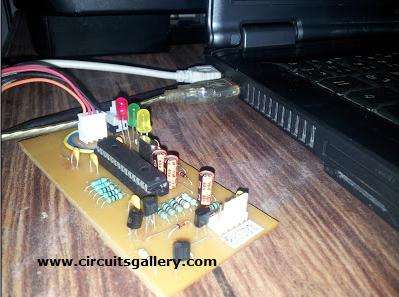
This DIY PIC programmer is a continuation of our PIC programming basics tutorial. By using this USB PIC programmer, you can program microchip PIC series of 10F, 12F, 16F, 18F, 24F, 30F. This is also an EEPROM programmer as it supports 12Cxx EEPROM. The main component of this PIC microcontroller programming circuit is a PIC182550 microcontroller which controls the overall circuit. Serial port PIC programmers are the widely used PIC chip programmer Kit, but since laptops have no RS232 ports they require an USB to RS232 converter.
Recommended for you:
- PIC microcontroller Beginner’s guide: Basic connection circuit
- How to burn or program PIC Microcontroller?
Now one of the main advantages of this circuit is that it does not require any external power supply, instead it uses USB power. It generates programming voltage of 13V through voltage multipliers. Linux PIC programmer software is also available for burning. You can program micro controller like pic16f84a, pic16f877a, pic18f4550, pic16f628a etc. and make your micro controller programming easier.
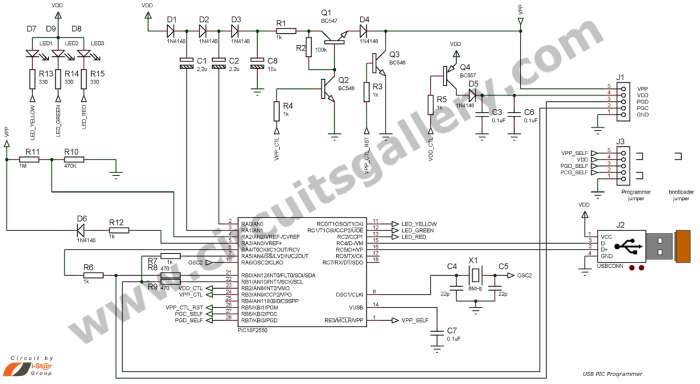
Circuit diagram of PIC Chip Programmer
Components Required
- Microcontroller PIC 18F2550
- Transistor (BC548-2Nos, BC547, BC557)
- Diode IN4148(6Nos)
- Resistor(IK-7Nos, 100K, 470-2Nos, 1M, 470K, 330-3Nos)
- Capacitor(0.01uF-3Nos,2.2uF-2Nos, 10uF, 22pf-2Nos)
- Crystal 8MHz
- USB Connector
- 5-Pin Header (2Nos)
Step by Step procedure
- PIC 18F2550 has an inbuilt USB port which makes PC interfacing much easier.
- First a firmware should be burnt to PIC 18F2550 using any PIC programmer and then connect the jumper as in the circuit diagram.
- The jumper connection decides the mode of the programmer, i.e. boot loader mode or programmer mode. Boot loader is used to upgrade your firmware and programmer mode is to burn the PIC microchip.
- Next we need software to burn our PIC, USB PIC Prog is suitable for this hardware. Download USB PIC Programmer Software from the following link
File Name: x86 (32 Bit) USB_PIC_Programmer_Software_USB_PIC_Prog.rar
x64 (64 bit) USB_PIC_Programmer_Softwarex64
Now connect the circuit to the USB port of your PC and open hex file to PIC programmer software.
- Connect any PIC microchip through the ICSP (In Circuit Serial Programming) Header, it include VPP, VDD, PGD, PGC, GND.
- Now you are done with it. So what are you waiting for? Start burning PIC microcontroller.
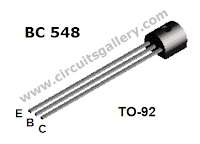
Components Pin Out
PIC Programmer Circuit Video Demonstration
Here is the demo video of the PIC USB programmer circuit. Watch and subscribe to get more videos from Circuitsgallery Youtube channel.
For more detail: How to burn or program PIC Microcontroller?
- Which PIC microcontroller controls the programmer circuit?
The PIC18F2550 microcontroller controls the overall circuit. - Does this programmer require an external power supply?
No, it uses USB power and generates the programming voltage via voltage multipliers. - What target devices can this programmer program?
It can program Microchip PIC series 10F, 12F, 16F, 18F, 24F, 30F and supports 12Cxx EEPROM. - How is the mode (bootloader or programmer) selected?
The jumper connection in the circuit decides bootloader mode or programmer mode. - What software is recommended to burn PICs with this hardware?
USB PIC Prog software is recommended for this hardware. - What connections are included on the ICSP header?
The ICSP header includes VPP, VDD, PGD, PGC, and GND. - Is a firmware burn required before using the programmer?
Yes, first firmware should be burnt to the PIC18F2550 using any PIC programmer. - Can this programmer work with laptops that lack RS232 ports?
Yes, since it uses USB directly, it eliminates the need for RS232 to USB converters used by serial programmers.
Related projects
CAN FD Node based on a PIC18 Microcontroller
The introduction sets the stage for an embedded systems project that involves developing a Embedded C CAN FD project using the MCP2517FD...
Communication & InterfacingLAN9662 Gigabit Switch: Optimized for Industrial Ethernet
Introduction It should come as little surprise therefore that one element of what is now more commonly referred to in some circles...
Communication & InterfacingPIC Microcontroller: Fundamentals & Applications for Students
Introduction Microcontrollers are the key components in the embedded systems market. A variety of embedded systems was formed and developed after the...
Communication & Interfacing10BASE-T1S Ethernet: Simplified OEM Design for Auto Devices
Introduction Cars these days are surrounded by technology. They come loaded with all sorts of electronic gadgets and sensors. This project wants...
Communication & InterfacingDesigning a Microcontroller Framework for PC-Based Control of Electrical Appliances
ABSTRACT The preference for personal computers as a platform for designing and implementing control algorithms is growing due to the ease of...
Communication & InterfacingEfficient Multichannel Data Acquisition with USB Connectivity using PIC Microcontroller
1. INTRODUCTION With the rapid advancements in embedded technology, there is a growing demand for a data acquisition system that combines fast...

Ibrar Ayyub
I am an experienced technical writer holding a Master's degree in computer science from BZU Multan, Pakistan University. With a background spanning various industries, particularly in home automation and engineering, I have honed my skills in crafting clear and concise content. Proficient in leveraging infographics and diagrams, I strive to simplify complex concepts for readers. My strength lies in thorough...