


Summary of A video game with software generated video signal !
This article describes a modern Pong game built on a PIC 16F84 microprocessor running at 12MHz, featuring software-generated video signals. The project eliminates dedicated video chips by using the processor to calculate real-time graphics and audio during electron beam sweeps. It supports Human vs. Human, Human vs. Computer, and Computer vs. Computer modes, utilizing a joystick and fire button for controls.Parts used in the Software Generated Pong Game:
- PIC 16F84 Microprocessor
- Two Resistors (for 2-bit DA converter)
- Joystick
- Fire Button
- Reset Switch
- Television Set
- Data EEPROM
- Program EEPROM
- PORTB (used as shift register)
Introduction
I have made the game pong using a pic 16F84 running @ 12MHz. The game Pong was the world's first video game in the early 70's, this is a modern version of it, made with a little bit less hardware than the original version. In my version, the video signal is generated in software. The only hardware used for the video generation is two resistors forming a 2-bit DA converter. Usually the video signal is generated in video games is created with a dedicated video chips, reading the image data from a graphics memory. In this project the video signal is calculated in real-time by the microprocessor as the electron beam sweeps over the screen.
 How to play the game
The first screen is where you select how you want to play by moving the joystick: DOWN: Human vs. Human (H-H), LEFT: Human vs. Computer (H-C) or RIGHT: Computer vs. Computer (C-C). Start with FIRE. Unfortunately it is impossible to beat the computer, since there was not enough room to make the computer beatable. That makes the computer vs. computer game to play forever until someone reset the game using the reset switch. You start serving by pressing fire, it is also possible to change direction and speed of the ball using fire. The player who has the serve will get points. If the player with the serve miss the ball, then the serve goes over to the other player. When someone wins a game over picture will show and tell who won.
The software
With a processor performing 3MIPS, it is not easy to make a video signal in software. Each instruction performed takes 1/3 us. Each scan-line on the screen takes 64us, where 52us are visible, so it gives 52*3=156 visible clock cycles per line. Maximum resolution that can be obtained is 156 pixels in x-axis if the software is setting one pixel per clock (using for example only bcf and bsf), this would not give any game, so to make a ball bounce around more stuff has to be done, like loops and such. A loop quantifies the time to 3-clock pieces, giving a resolution of 52 pixels. (One could obtain a kind of 156pixels resolution with one or two offset nops, but the code to select this would eat to many clock cycles to do any good). In the pong game each line is treated different if there is a ball on it or not. If there is no ball on it, then all that has to be done is to show white color for a couple of clock cycles in the beginning or the end, depending on if the players are on this line or not. On a line with a ball, white should be shown in the middle for a couple of clock cycles, the delay before and after these white cycles are a function of the x position of the ball. The score is shown in the bottom of the screen, by loading the PORTB with the bitmap for the number and shift it out. In the main-screen, several letters are shown on each line. It is a little bit harder task, because the string has to be loaded and character bitmap has to be loaded for each letter. Doing all that and then showing it on the screen would make it possible to show only like three letters per line with a lot of spacing between them, which would be really ugly and useless as well. I solve this by calculating the bytes to shift out in one scan-line, and showing them the next, making it possible to show 8 chars per line. Unfortunately the characters are only drawn on every second line, but it is better than no characters at all. The text data is stored in the data eeprom, and the character bitmaps are stored in program eeprom as retlw tables.
So far I've only talked about the graphic generation. But there is more to it to get a video signal. All scan-lines first have a 4us-sync pulse, then black for 8us, then the 52us graphic comes. These horizontal sync-pulses makes the TV understand when a scan-line starts, but there is needed to send information about when a new picture starts too, it is called vertical sync, and is a special pattern that tells the TV that a new image is coming. There are two kinds of vertical sync, because the image is divided into two part images, showing even and odd lines, to get less flickering. In pong, the two images are identical, so the game is not using the full y-resolution possible, but it doesn't matter because it is way better than the x-resolution anyway, making the x-resolution the biggest problem.
The game stuff, like checking joystick and move stuff around, is taken care of in the first scan-lines, when no graphics is drawn. The sound is played during some free cycles close to the horizontal sync pulses, but not on all scan-lines, that's why the sound sounds very distorted.
 Making this kind of software is mostly a clock-cycle-counting project, all timings are quite critical, so whatever paths the execution-flow of the program takes, it must take the same number of clock cycles. This is quite hard, and I've not managed to do this on all lines, so the image is a little bit bent in some places. (Most analog tv-sets fix this, but on some digital projectors it is more visible)
The hardware
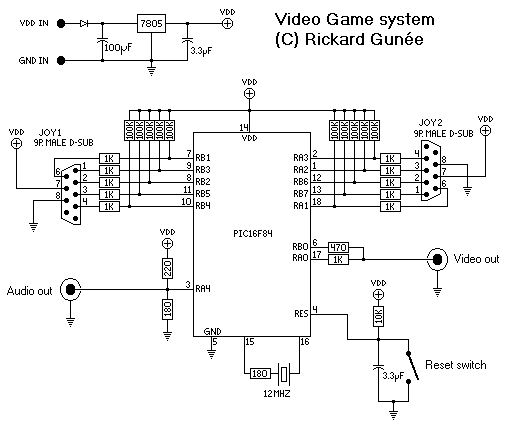
The hardware is quite simple because everything is made in software. Two resistors, forming a DA converter together with the input impedance of the TV, generate the video signal. This can generate the levels 0v (sync), 0.3v (black), 0.7v (gray), and 1.0v (white). To be able to handle the variation of input resistance of different audio equipment, two resistors are used to make a 1-bit DA to generate the audio. When generating the video, the PORTB is used as a shift register to get one pixel per instruction when high-resolution text is shown on the screen.
For more detail: A video game with software generated video signal !
Quick Solutions to Questions related to Software Generated Pong Game:
-
How is the video signal generated in this project?
The video signal is calculated in real-time by the microprocessor as the electron beam sweeps over the screen, rather than using dedicated video chips. -
Can a player beat the computer in this game?
No, it is impossible to beat the computer because there was not enough room in the code to make the computer beatable. -
What determines the maximum resolution of the game?
The resolution is limited by clock cycles per scan-line, allowing a maximum of 52 pixels in the x-axis due to loop quantification requirements. -
How are characters displayed on the main screen?
Characters are shown eight per line by calculating bytes to shift out in one scan-line and displaying them the next, though they are drawn only on every second line. -
Why does the sound in the game sound distorted?
The sound is played during free cycles close to horizontal sync pulses but not on all scan-lines, causing distortion. -
What hardware components generate the video levels?
Two resistors form a 2-bit DA converter together with the input impedance of the TV to generate levels for sync, black, gray, and white. -
Does the game use vertical sync for the image?
Yes, the game uses vertical sync patterns to indicate when a new picture starts, dividing the image into even and odd lines to reduce flickering. -
Where is the text data stored in the software?
The text data is stored in the data EEPROM, while character bitmaps are stored in program EEPROM as retlw tables.
Related projects
PIC Stepper Motor Controller using PIC16F84A with Proteus Simulation
Introduction Stepper motors are widely used in embedded systems and DIY electronics projects where precise position control is required. This PIC Stepper...
Programmers & ICSP · PIC16F84APIC Musical Doorbell using PIC16F84A with Proteus Simulation
IntroductionThis microcontroller project demonstrates a musical doorbell built around a PIC16F84A and a simple piezo sounder.Using two push buttons, the system allows...
Beginner Tutorials · PIC16C84Exploring the World of PIC Microcontrollers: An Architectural Overview
A Peripheral Interface Microcontroller (PIC), developed by General Instruments Microcontrollers in 1993, operates under software control and is programmed to execute various...
Games, Toys & CalculatorsExploring Leon’s Mini Random Number Generator (mRNG)
Sales Pitch Feeling overwhelmed by choices? Who isn't? Decision-making can be a maze. White, rye, or wheat? Pinstripes or polka dots? Feast...
Games, Toys & Calculators · PIC16F628ATIC TAC TOE game using PIC16F628
This project is not to introduce Tic Tac Toe. Everyone knows this game. It's to introduce two features. Bi-coloured LEDs, microcontrollers and...
Games, Toys & CalculatorsInteractive Blitz Chess: A Physical Blitz Chess Board Powered with PIC32
Introduction We created a companion system for physical chess boards to help players enjoy their fast paced blitz game with a chess...

Ibrar Ayyub
I am an experienced technical writer holding a Master's degree in computer science from BZU Multan, Pakistan University. With a background spanning various industries, particularly in home automation and engineering, I have honed my skills in crafting clear and concise content. Proficient in leveraging infographics and diagrams, I strive to simplify complex concepts for readers. My strength lies in thorough...