


Summary of The 2$ USB Pic Programmer & Serial Cable
This article describes a low-cost DIY PIC microcontroller programmer using a USB virtual COM port module and basic electronic components. It is designed for infrequent users, as the programming process takes 5–30 minutes. The guide details circuit assembly, software configuration using PICPgm in JDM mode, and troubleshooting counterfeit PL2303HX chips.Parts used in the 2$ USB Pic Programmer:
- USB virtual com port module or cable with DTR, CTS and RTS
- NPN Transistor (BC547B or BC338)
- 1 x 4.7 Kohm Resistor
- 2 x 10 Kohm Resistor
- STABLE 12 volt power supply
- Wires and soldering iron
- PICPgm Software
What you need:
USB virtual com port module or cable with DTR, CTS and RTS.
1 x NPN Transistor etc. BC547B or BC338
2 x 10 Kohm Resistor
1 x 4.7 Kohm Resistor
A STABLE 12 volt power supply
Some wires a soldering iron
Step 1: The Circuit
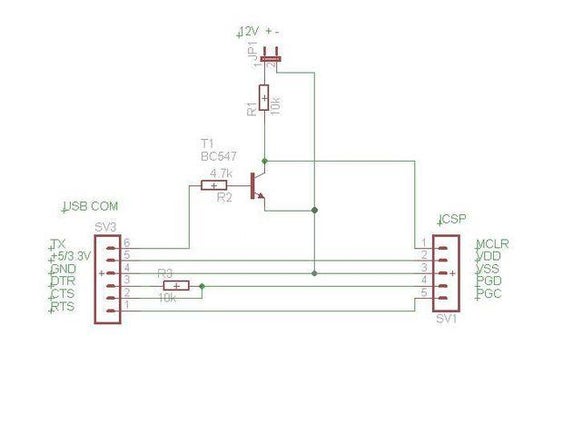
This simple circuit will work with the free programmer software PICPgm
selecting it to operate as an JDM programmer.
Check out the the amazing numbers of supported devices and the software is available for Windows, Mac OS and Linux.
The second circuit makes the USB com both an programmer and a standard serial cable.
Update:
As pointed out by dev26th in comment section:
Connect MCLR with a 10k. resistor to Ground.
This prevents MCLR from floating.
Step 2: The USB Virtual Com Port
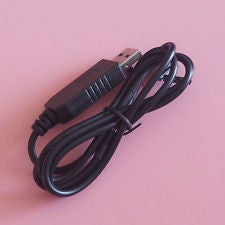
My solution is based on the 2 $ USB virtual com port chip PL2303HX CABLE from ebay see it here
As seen on ebay there is a housing and you cant see the available pin outs. The housing opens easely. My cable came with the following pins TX,RX, +5V, +3.3V, Ground, RTS, DTR, DSR, CTS, DCD, but you need to ask seller which pins are available to be sure.
All other USB com modules with the RTS, DTR, CTS pins available will work.
20.5.2015 Note: Some time after publishing this instructable I became aware that some of PL2303HX chips on the marked are counterfeit. I tested this instructable on XP machine and had no problems and therefore not aware of this. I installed a custom hardware solution on another computer running windows 8.1 with another cable and realized that cable was counterfeit.
If you bought a counterfeit model and you are having driver issues, the driver error code will most likely be 10. If you google the chip number and the error code you will find a solution to make it work. I'm sorry for this issue, I don't support counterfeit.
Step 3: The SMD Hack
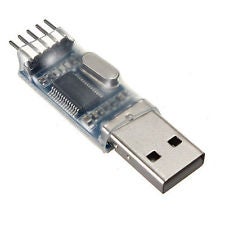
This even cheaper module as the picture shows, can be used if you can solder on smd chips. Remove the plastic and look for the dot which is pin 1. Solder wires on pin 2, 3 and 11.
Step 4: PICPgm Software
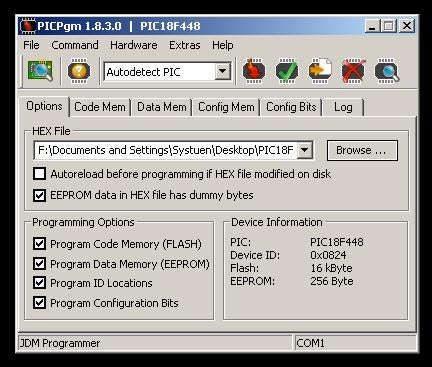
As the picture show I have successfully recognized a PIC18F448
Step 5: PICPgm Settings
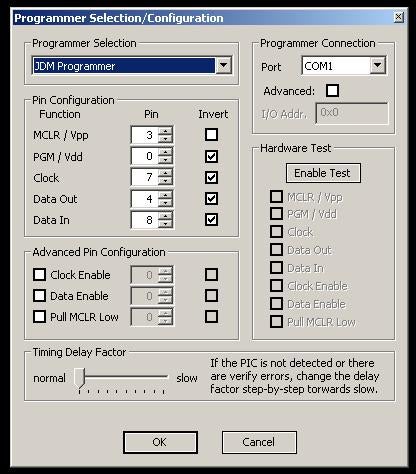
In Hardware Settings choose JDM programmer, the correct com port. Invert all pins except MCLR.
You now have a functional ICSP programmer. Good Luck
Source: The 2$ USB Pic Programmer & Serial Cable
Quick Solutions to Questions related to 2$ USB Pic Programmer:
- Who is this programmer intended for?
It is intended for people who need a microchip pic programmer but seldom do so and find investing in a pic kit too expensive. - How long does the programming process take?
The process takes 5-30 minutes depending on hex file size. - Is this recommended for microchip software developers?
No, it is NOT recommended for microchip software developers due to the long programming time. - What software is required to operate this circuit?
You must use the free programmer software PICPgm selecting it to operate as an JDM programmer. - Which pins are essential on the USB virtual com port?
You need a module with DTR, CTS and RTS pins available. - How do you prevent MCLR from floating?
Connect MCLR with a 10k resistor to Ground. - What error code indicates a counterfeit PL2303HX chip?
The driver error code will most likely be 10 if you bought a counterfeit model. - Which pins should be soldered when using the SMD hack module?
Solder wires on pin 2, 3 and 11 after locating pin 1 marked by a dot. - What hardware setting is required in PICPgm?
In Hardware Settings choose JDM programmer, the correct com port, and invert all pins except MCLR.
Related projects
CAN FD Node based on a PIC18 Microcontroller
The introduction sets the stage for an embedded systems project that involves developing a Embedded C CAN FD project using the MCP2517FD...
Communication & InterfacingLAN9662 Gigabit Switch: Optimized for Industrial Ethernet
Introduction It should come as little surprise therefore that one element of what is now more commonly referred to in some circles...
Communication & InterfacingPIC Microcontroller: Fundamentals & Applications for Students
Introduction Microcontrollers are the key components in the embedded systems market. A variety of embedded systems was formed and developed after the...
Communication & Interfacing10BASE-T1S Ethernet: Simplified OEM Design for Auto Devices
Introduction Cars these days are surrounded by technology. They come loaded with all sorts of electronic gadgets and sensors. This project wants...
Communication & InterfacingDesigning a Microcontroller Framework for PC-Based Control of Electrical Appliances
ABSTRACT The preference for personal computers as a platform for designing and implementing control algorithms is growing due to the ease of...
Communication & InterfacingEfficient Multichannel Data Acquisition with USB Connectivity using PIC Microcontroller
1. INTRODUCTION With the rapid advancements in embedded technology, there is a growing demand for a data acquisition system that combines fast...

Muhammad Bilal
I am a highly skilled and motivated individual with a Master's degree in Computer Science. I have extensive experience in technical writing and a deep understanding of SEO practices.