


Summary of Simple JDM PIC Programmer using PIC16f84A microcontroller
This article details a DIY JDM PIC Programmer powered directly via an RS232 serial port, compatible with specific PIC microcontrollers. It outlines the schematic design, software requirements ("Win PIC Programmer"), and a step-by-step guide for creating the PCB using WinQcad, toner transfer, and ferric chloride etching. The author notes that while effective on desktop PCs, laptop serial ports may lack sufficient voltage.Parts used in the Simple JDM PIC Programmer:
- RS232 Serial Port (PC)
- PIC16f84A Microcontroller
- PIC16f628A Microcontroller
- Ferric Chloride (Etching Solution)
- Toner Transfer Method Materials
- WinQcad Software
- Win PIC Programmer Software
Simple JDM PIC Programmer
I have built this project to burn my small PIC's
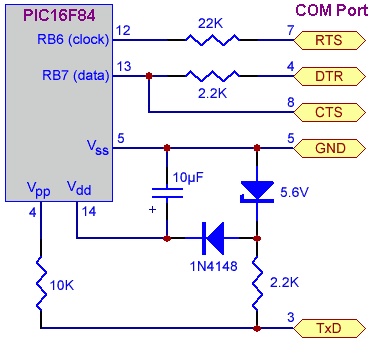
This is a serial programmer works on the RS232 ( PC serial port ), known as JDM Programmer, thanks to the site http://pic16f84.hit.bg/ which contains the schematic and the programmer software.
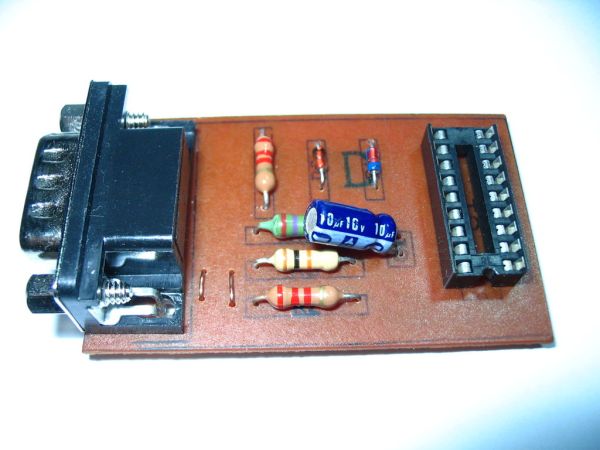
The programmer is powered from the Serial port itself, so there's no need to any external power supply.
But be careful this circuit will not work with the Laptop Serial port due to the weak voltages it has.
- I have used a very nice programmer software called "Win PIC Programmer" you can download it from
http://freenet-homepage.de/dl4yhf/winpicpr.html, it's very stable and powerful.
The project has been tested with the following IC's :
PIC16f84A
PIC16f628A
Step 1
The schematic
Step 2: The PCB
- I have made the PCB using WinQcad Software it's easy and has a nice autorouting feature. Please download the PDF document which contains the true scale dimensions.
You will see two files :
PCB.pdf and PCB_copper_pour.pdf
the second one has a "mass copper pour" to save your etching solution and to speed up the etching process without affecting your tracks.
- I used the Toner Transfer method draw the tracks, i can say the output is nice. I have included the steps required to make PCB in the following steps.
 PCB.PDF(198x112) 14 KBPCB_copper_pour.PDF(198x112) 39 KB
Step 3
Toner Still on the PCB
This output from the Ironing process, you can see the black toner tracks, the paper has been removed using a tooth brush.
Step 4
Etching
Be careful it's a toxic material don't do this step in your kitchen.
Actually i did, but my wife wasn't there 🙂
- How is the programmer powered?
The programmer is powered from the Serial port itself without needing an external power supply. - Can I use this circuit with a Laptop Serial port?
No, the circuit will not work with Laptop Serial ports due to their weak voltages. - What software is recommended for programming?
The author recommends using Win PIC Programmer because it is stable and powerful. - Which PIC chips have been tested with this project?
The project has been tested with PIC16f84A and PIC16f628A microcontrollers. - What software was used to design the PCB?
WinQcad Software was used to make the PCB due to its easy interface and autorouting feature. - What method was used to draw the tracks on the PCB?
The Toner Transfer method was used to draw the tracks. - What chemical did the author use for etching?
The author used Ferric chloride as the etching solution. - Is there a way to speed up the etching process?
Yes, using a mass copper pour on the PCB can save etching solution and speed up the process.
Related projects
PIC Stepper Motor Controller using PIC16F84A with Proteus Simulation
Introduction Stepper motors are widely used in embedded systems and DIY electronics projects where precise position control is required. This PIC Stepper...
Programmers & ICSP · PIC16F84APIC Musical Doorbell using PIC16F84A with Proteus Simulation
IntroductionThis microcontroller project demonstrates a musical doorbell built around a PIC16F84A and a simple piezo sounder.Using two push buttons, the system allows...
Programmers & ICSP · PIC16F628ADHT11 Low Cost Humidity Sensor using PIC16F628A with Proteus Simulation
IntroductionThis microcontroller project demonstrates how to interface a low-cost DHT11 temperature and humidity sensor with a PIC16F628A using a Proteus simulation environment.The...
Programmers & ICSPCalculator Test using PIC24FJ64GA006 with Proteus Simulation
Introduction The Calculator Test using EASYHDL is a practical microcontroller project built on the PIC24FJ64GA006 and simulated in Proteus. This project demonstrates...
Programmers & ICSPPID Controlled Oven using TMS320F28027PT with Proteus Simulation
IntroductionThis project demonstrates a PID controlled oven implemented using a PICCOLO TMS320F28027PT microcontroller and verified through Proteus simulation.It is a practical microcontroller...
Programmers & ICSPPICCOLO Motor Controller Sample Design using TMS320F28023PT with Proteus Simulation
IntroductionThis project demonstrates a PICCOLO motor controller sample design implemented using the TMS320F28023PT Piccolo microcontroller and tested through Proteus simulation. It focuses...

Ibrar Ayyub
I am an experienced technical writer holding a Master's degree in computer science from BZU Multan, Pakistan University. With a background spanning various industries, particularly in home automation and engineering, I have honed my skills in crafting clear and concise content. Proficient in leveraging infographics and diagrams, I strive to simplify complex concepts for readers. My strength lies in thorough...