
Summary of SAVING PIC MICROCONTROLLERS WITH DIY PROGRAMMER
Summary: Tahmid repurposed a Raspberry Pi Pico running MicroPython as a DIY programmer for old flash-based PIC microcontrollers. The Pico detects, erases, and flashes .hex files via a simple drag-and-drop workflow. Voltage differences are handled with a Pico-controlled boost converter and a level shifter. Code is on his GitHub; the approach can be adapted to other microcontrollers and prioritized development speed over performance.
Parts used in the Pi Pico PIC Programmer:
- Raspberry Pi Pico
- Boost converter (to provide higher PIC programming voltage)
- Level shifter
- Wires and connectors for PIC target
- Host computer for drag-and-drop .hex file transfer
- PIC microcontroller(s) to be programmed
When working on a project, plenty of us will reach for an Atmel microcontroller because of the widespread prevalence of the Arduino platform. A few hackers would opt for a bit more modern part like an ESP32. But these Arduino-compatible platforms are far from the only microcontrollers available. The flash-based PIC family of microcontrollers is another popular choice. Since they aren’t quite as beginner or user-friendly, setting up a programmer for them is not as straightforward. [Tahmid] needed to program some old PIC microcontrollers and found the Pi Pico to be an ideal programmer.
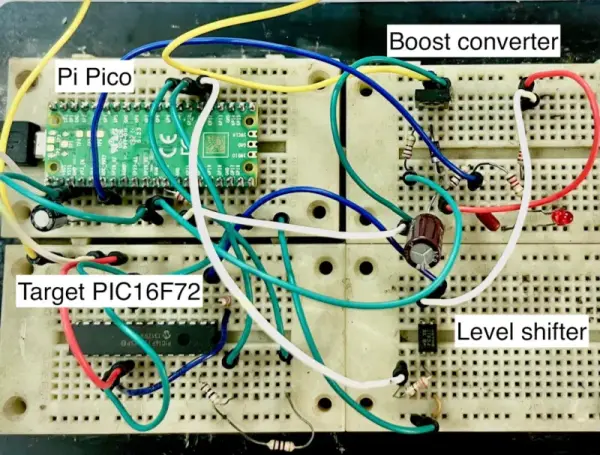
The reason for reaching for the Pico in the first place was that [Tahmid] had rediscovered these decade-old microcontrollers in a parts bin but couldn’t find the original programmer. Thanks to advances in technology in the last ten years, including the advent of micropython, the Pico turned out to be the ideal programmer. Micropython also enables a fairly simple drag-and-drop way of sending the .hex file to the PIC, so the only thing the software has to do is detect the PIC, erase it, and flash the .hex file. The only physical limitation is that the voltages needed for the PIC are much higher than the Pico can offer, but this problem is easily solved with a boost converter (controlled by the Pico) and a level shifter.
[Tahmid] notes that there’s plenty of room for speed and performance optimization, since this project optimized development time instead. He also notes that since the software side is relatively simple, it could be used for other microcontrollers as well. To this end, he made the code available on his GitHub page. Even if you’re more familiar with the Arduino platform, though, there’s more than one way to program a microcontroller like this project which uses the Scratch language to program an ESP32.Source: SAVING PIC MICROCONTROLLERS WITH DIY PROGRAMMER
- Why use a Pi Pico to program PIC microcontrollers?
The Pico running MicroPython provides an easy drag-and-drop workflow and can detect, erase, and flash .hex files, making it an effective DIY programmer. - How does the Pico handle the PICs higher voltage requirements?
The project uses a boost converter controlled by the Pico and a level shifter to meet the higher voltage needs. - What software runs on the Pico for programming PICs?
MicroPython is used on the Pico to implement detection, erase, and flash functionality. - Can this approach be adapted to other microcontrollers?
Yes; the article notes the software side is simple and could be used for other microcontrollers as well. - Where can I find the project code?
The code is available on Tahmid's GitHub page as stated in the article. - Does this project prioritize performance or development speed?
The project optimized development time rather than speed and performance, leaving room for future optimization. - What is the basic workflow for flashing a .hex file?
Drag-and-drop the .hex file to the Pico, which then detects the PIC, erases it, and flashes the file. - Is the Pico alone sufficient electrically to program PICs?
No; the Pico cannot supply the higher voltages directly and requires a boost converter and level shifter.

