


Summary of Original PICKIT-2 microcontroller programmer
The author designed a custom, single-sided PICkit 2 programmer compatible with Microchip MPLAB IDE. By modifying the original schematic to remove unused memory chips and connectors, they created a compact PCB using mostly SMD components. The device successfully programmed a PIC16F628A microcontroller without issues, offering a reliable alternative to existing versions.Parts used in the Custom PICkit 2 Programmer:
- MCP6001U
- FDC6420C
- PIC18F2550 microcontroller
- SS14 diodes (replacing BAT54 and ZHCS1000)
- SMD parts
- Jumpers
These days I was thinking about a better PIC programmer that can work with MicrochipMPLAB IDE software so that I can write my own programs or edit someone else’s programs. I found that there are numerous versions of the famous Microchip PICkit 2 on the web.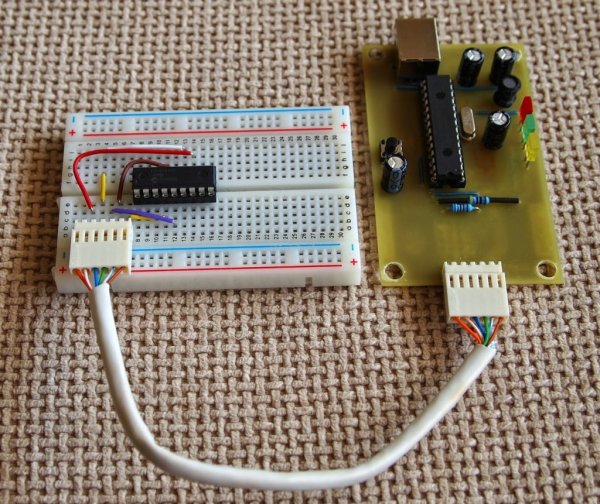
Some of them are using the original schematic published by Microchip and some are lite versions – with different parts or simplified schematics. None of them satisfied my requirements. So I got the original schematic, removed the memory chips and the input ICSP connector (which I didn’t plan to use anyway) and made a new single sided PCB. I used mostly SMD parts.
Schematic
I found out that I can get all parts for the original schematic from local stores, and only two –MCP6001U and FDC6420C – I had to order from Farnel. I also decided to replace two Schottky diodes BAT54 and ZHCS1000 with SS14 because of more convenient package. I programmed the PIC18F2550 microcontroller with my Chinese programmer. Here is the schematic which I used:
In the end the schematic is not exactly like the original one but it is close enough I used the same notifications of the parts like in the original schematic.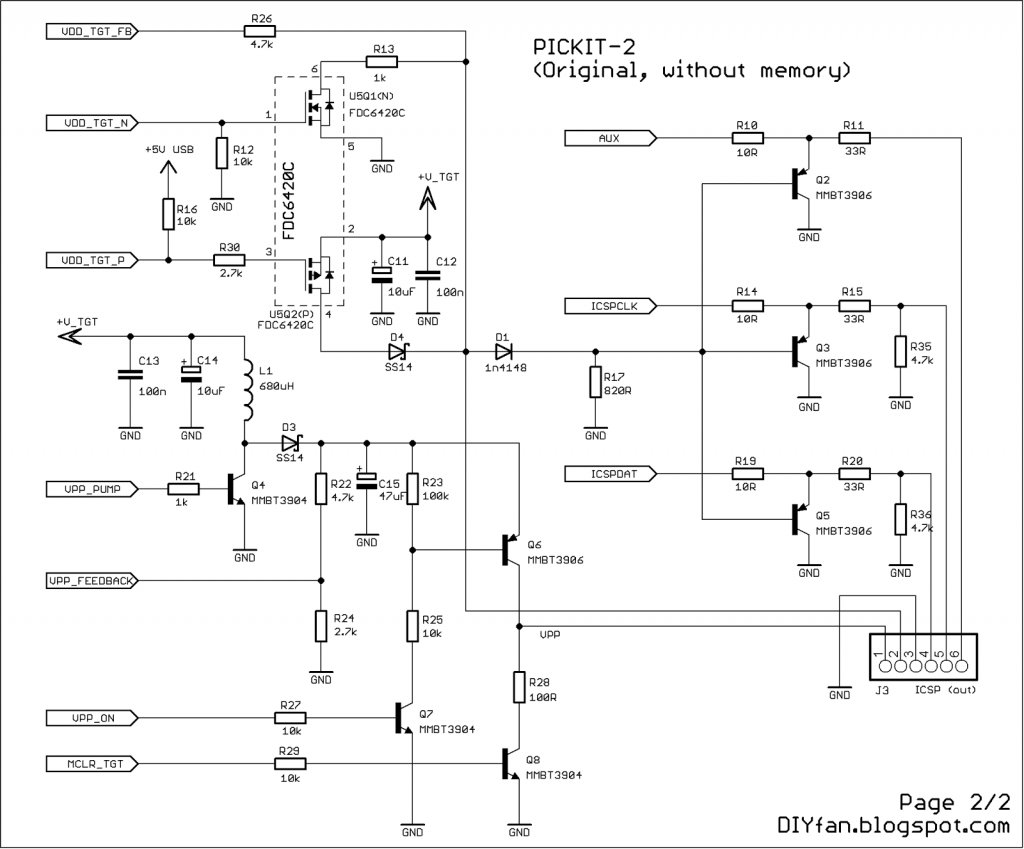
PCB
It is one sided and has only five jumpers. The size is comparatively small – 83mm x 52mm.
I don’t want to brag, but I think I made the best one sided PCB for PICkit 2 programmer. It also works without any hiccups. I tested it with an PIC16F628A which I have at hand. It was recognized in both PICkit 2 software and MPLAB IDE.
Here is the picture of the programmer connected to the breadboard with the PIC16F628A on it.
For more detail: Original PICKIT-2 microcontroller programmer
Quick Solutions to Questions related to Custom PICkit 2 Programmer:
- What software does this custom programmer work with?
It works with Microchip MPLAB IDE software. - How many jumpers are on the PCB?
The PCB has five jumpers. - Can I find all parts for the original schematic at local stores?
No, two specific parts had to be ordered from Farnel. - Which diodes were replaced with SS14?
BAT54 and ZHCS1000 Schottky diodes were replaced. - Does the new PCB use through-hole or surface mount technology?
The design uses mostly SMD parts. - What is the size of the single-sided PCB?
The size is 83mm x 52mm. - Did the author test the programmer with a specific microcontroller?
Yes, it was tested with a PIC16F628A. - Why did the author remove the input ICSP connector?
The author did not plan to use the input ICSP connector.
Related projects
Calculator Test using PIC24FJ64GA006 with Proteus Simulation
Introduction The Calculator Test using EASYHDL is a practical microcontroller project built on the PIC24FJ64GA006 and simulated in Proteus. This project demonstrates...
Programmers & ICSPPID Controlled Oven using TMS320F28027PT with Proteus Simulation
IntroductionThis project demonstrates a PID controlled oven implemented using a PICCOLO TMS320F28027PT microcontroller and verified through Proteus simulation.It is a practical microcontroller...
Programmers & ICSPPICCOLO Motor Controller Sample Design using TMS320F28023PT with Proteus Simulation
IntroductionThis project demonstrates a PICCOLO motor controller sample design implemented using the TMS320F28023PT Piccolo microcontroller and tested through Proteus simulation. It focuses...
Programmers & ICSP · PIC16F84APIC Musical Doorbell using PIC16F84A with Proteus Simulation
IntroductionThis microcontroller project demonstrates a musical doorbell built around a PIC16F84A and a simple piezo sounder.Using two push buttons, the system allows...
Programmers & ICSP · PIC16F877AEPE PIC/LCD Demo using PIC16F877 with Proteus Simulation
IntroductionThe EPE PIC/LCD Demo is a classic microcontroller project that demonstrates how a PIC16F877 can fully control a PG12864F graphical LCD.Designed as...
Programmers & ICSP · PIC16F628ADHT11 Low Cost Humidity Sensor using PIC16F628A with Proteus Simulation
IntroductionThis microcontroller project demonstrates how to interface a low-cost DHT11 temperature and humidity sensor with a PIC16F628A using a Proteus simulation environment.The...

Ibrar Ayyub
I am an experienced technical writer holding a Master's degree in computer science from BZU Multan, Pakistan University. With a background spanning various industries, particularly in home automation and engineering, I have honed my skills in crafting clear and concise content. Proficient in leveraging infographics and diagrams, I strive to simplify complex concepts for readers. My strength lies in thorough...