


Of all the types of measurement, temperature measurement is one that comes up the most often and is perhaps the one that is easiest to do. I heard this interesting story once from a University Grad who started a company along with a few friends developing temperature controllers. Anyway, it turns out that its a saturated market, the company went bust and he at the time was working for a company that supplied temperature controllers. Well, at least he stuck with one aspect of the business plan.
Anyway, back to the present. Temperature features in many aspects of day to day life. Just imagine a cold cup of coffee in the morning or the opposite a scalding cup of coffee that lifts a layer of skin off the roof of your mouth. No, not something we want to happen.
Step 1: Lead in . . .
Temperature measurement is as essential application, and is one that is found in many aspects of manufacturing simply because melting temperatures, setting temperatures and operational temperatures determine if the process completes and whether the end product is useable.
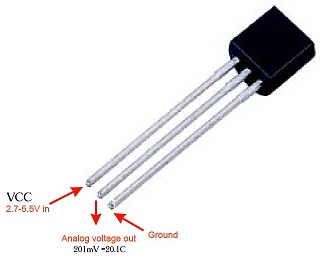
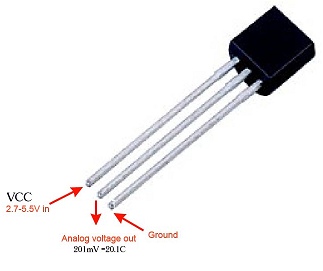
The type of sensor used depends on the application, and for industrial applications a type of sensor called a thermocouple is used. For the purpose of this article I am going to use a much simpler device known as the LM35. This is a very simple device that is built into the same package as a transistor, looks the same too. So they can be confused with a BC237 or similar device.
While I am writing this I realized that I had written a similar article in the past. So if you are interested in some nostalgia, here is the link Temperature Display Project.
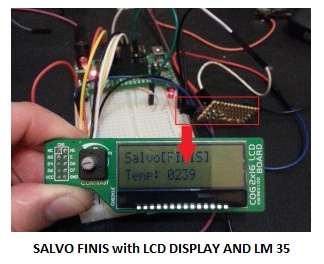
This time around I am applying the same code to the Salvo [FINIS] using the PIC16F1827. This device is one that I have been using in quite a number of postings and is supplied as an alternative device to the PIC16F628 in the options from Tindie. The PIC16F628 however does not have A2D conversion, instead it has analogue comparators.
Note: This project is compatible with the PIC16F1847 as well,
Just to recap on the LM35. The LM35 converts temperature to an output voltage equivalent to 10mV / C. This level of resolution is ideal for general temperature display for example.
If you would like to build the same using a PIC16F688, see the following Temperature Display Project
Step 2: The Code . . .
So below is the code, that will make the project work:
// LCD module connections
sbit LCD_RS at RA0_bit;
sbit LCD_EN at RA1_bit; // sbit LCD_EN at RB3_bit;
sbit LCD_D4 at RB4_bit;
sbit LCD_D5 at RB5_bit;
sbit LCD_D6 at RB6_bit;
sbit LCD_D7 at RB7_bit;
sbit LCD_RS_Direction at TRISA0_bit;
sbit LCD_EN_Direction at TRISA1_bit; // sbit LCD_EN_Direction at TRISB3_bit;
sbit LCD_D4_Direction at TRISB4_bit;
sbit LCD_D5_Direction at TRISB5_bit;
sbit LCD_D6_Direction at TRISB6_bit;
sbit LCD_D7_Direction at TRISB7_bit;
char LCDTXT[] = "Salvo[FINIS]";
char LCDMSG[] = "Data";
char uart_rd;
unsigned short new_DC, current_DC;
long ADC_Value = 0;
unsigned int adc_rd;
unsigned char ch;
char *temp = "0000";
int i=0;
long tlong;
/*
Configures system values for startup
*/
void TempDisplay()
{
adc_value = ADC_Read(4);
adc_value = (long)adc_value * 5000;
adc_value = adc_value / 1023;
temp[0] = adc_value/1000 + 48;
temp[1] = (adc_value/100)%10 + 48;
temp[2] = (adc_value/10)%10 + 48;
temp[3] = adc_value%10 + 48;
Lcd_Out(2,1,"Temp:");
Lcd_Out(2,7,temp);
Delay_ms(20);
}
void IOConfig()
{
// Disable Analog
ANSELA = 0x08;
ANSELB = 0x0;
// Ports
TRISB = 0xF8;
TRISA = 0x10;
// PIC16F1827 has two capture compare modules and both need to be disabled
CCP1CON = 0x0;
CCP2CON = 0x0;
INTCON = 0; // disable all interrupts
CPSCON0=0;
ADCON0 = 0x10;
CM1CON0 = 0x0;
}
void LCDConfig()
{
Lcd_Init(); // Initialize LCD
Lcd_Cmd(_LCD_CLEAR); // Clear display
Lcd_Cmd(_LCD_CURSOR_OFF); // Cursor off
Lcd_Out(1,1,LCDTXT); // Write text in first row
}
void main() {
IOConfig();
LCDConfig();
while(1)
{
LED(); // Test display signal
TempDisplay();
}
}
Step 3: Technical Details Wrap Up . . .
The more technical details:
I have set the A2D input on channel four (4), but this can be moved to any of the other inputs. To change the analogue settings by changing the following the settings.
The register ANSELA and ADCON0 registers, need to be changed to configure the correct CH (channel). Bear in mind that only one analogue input can be used at a time and a settling period is required if or when the channel is changed – the value is the same for both registers.
In the next article, we will use the temperature display to create a thermostat of sorts which will be used to control a fan for cooling.
Source: Measure Temperature With an LM35
Related projects
Spectrum Analyzer using TMS320F28023DA with Proteus Simulation
Introduction This project demonstrates a real-time audio spectrum analyzer using the TMS320F28023DA Piccolo microcontroller, simulated in Proteus VSM. The system captures an...
Sensors & TemperatureDHT22 Low Cost Humidity Sensor using PIC18F25K20 with Proteus Simulation
IntroductionThis microcontroller project demonstrates how to interface a DHT22 (RHT03) digital temperature and humidity sensor with a PIC18F25K20 using Proteus simulation.The project...
Sensors & TemperatureCrafting a Microcontroller-Based Temperature Monitoring System
Abstract As technological advancements progress, processes become increasingly intricate, demanding a corresponding expansion in the parameters necessary for efficient analysis. Data acquisition,...
Sensors & TemperatureAutomated Room Temperature Monitoring System using Microcontrollers
Abstract Monitoring the temperature within a computer server room stands as a crucial responsibility to uphold the server's performance amidst potential disruptions...
Sensors & TemperatureInnovative Approaches to Control System Design for 100KV Impulse Generators
1. INTRODUCTION An impulse generator is an electrical device designed to generate short-duration surges of high voltage or high current. Impulse signals...
Sensors & TemperatureSmart Baby Incubator: Enhancing Care with PIC Microcontrollers
INTRODUCTION Within the effective Baby Incubator system, the incubator serves as an infant-stimulation apparatus designed for the intensive care of newborns, particularly...

Muhammad Bilal
I am a highly skilled and motivated individual with a Master's degree in Computer Science. I have extensive experience in technical writing and a deep understanding of SEO practices.