


Summary of Laser show for poor man using PIC18F1220 microcontroller
This article details a DIY three-axis laser spirograph project using a PIC microcontroller (PIC18F1220/1320) to create dynamic light patterns. The device features manual and automatic modes, with an updated V2 version offering SMT components, pattern storage, and a compact design. It utilizes PWM signals to control CPU cooling fans acting as mirror actuators, driven by a green laser module powered via an adjustable regulator.Parts used in the Laser show for poor man:
- PIC18F1220 or PIC18F1320 microcontroller
- 2N7000 MOSFET transistor
- 5V or 12V CPU cooling fan (200mA max)
- Acrylic front surface mirror
- Green laser pointer module (3V rated)
- LM317 voltage regulator
- Resistors and capacitors
- Potentiometers
- Toggle switch
- Power jack and prototyping board
- USB ICD2 programmer or socket programmer
- Dremel tool with sanding drum
Laser show for poor man
Here's another useless but cool looking "must build" gadget for every romantic geek.
Let me introduce PIC microcontroller based three axis laser spirograph.
Step 1
Gathering stuff

Design is quite simple and employs regular parts and components but you are free to change/modify it in way you like.
At first prototype I used blank DVD as reflective material but later I discovered more practical way. Technology of making FS mirror is described in my article
DIY Front Surface Mirror
Originally I'm very lazy man so I've chosen programmed microcontroller PIC18F1220 (can be replaced with PIC18F1320) to handle routine job.
PIC implements 3 channels PWM generator.
Actually it's the same engine as one I used in my IKEA light project just code is adopted for PIC18.
PWM signal toggles MOSFET transistor 2N7000 (Id 200mA). Mirror actuator is connected as load to MOSFET.
As mirror actuator I used 5V 200mA CPU cooling fan. It's easy to mount mirror on its flat side.
Device accepts 5V and 12V fan with maximum current 200mA . Voltage is selected by jumper.
Green laser pointer is rated at 3V so I've made LM317-based voltage regulator with adjustable output.
Cheap 5mW green laser module:
http://www.dealextreme.com/details.dx/sku.10094~r.32746761
What else will you need?
Dozen of resistors and capacitors, potentiometers, toggle switch, power jack, prototyping board, box of proper size and power supply unit.
Step 2
Brain
There are two work modes, selected by toggle switch: manual and automatic.
In manual mode operator controls each motor individually by twisting corresponding potentiometer connected to analog input of microcontroller. PIC constantly reads analog inputs and modifies PWM signal so duty value is proportional to voltage on analog input.
In automatic mode microcontroller employs pseudo-random algorithm to calculate duty value for every motor.
Current duty value is stored in internal EEPROM and used as initial data for next calculation
so microcontroller will generates sequence of nonrepetitive unique patterns for long time.
Most pointers are rated from 3V to 4.5V, so make sure you adjust output voltage before connecting laser.
Board is small, so you don't need any brackets to secure it. Pots will hold it perfectly.
UPDATE NOTE !!!
Since my supplier run out of PIC18F1220, I had to use PIC18F1320 in new design.
It's pin-compatible chip with increased memory capacity, but it will NOT work with old HEX file,
so pay attention.
I keep PIC18F1220 version as separated file.
Here are some notes from the bench:
- schematic;
- BOM;
- HEX (PIC18F1320 version);
- PCB;
- PCB in AutoCAD format
- source code for CCS compiler.
To program chip, I use USB ICD2 programmer (bought it from eBay) and MPLAB IDE (free soft from Microchip.com).
PCB contains standard Microchip ICSP port (5-pins header) for programming purpose, also chip can be programmed by any socket programmer with proper software which supports PIC18.
Controller board assembling (high res guide):
http://www.flickr.com/photos/22144851@N03/sets/72157604945292921/
...
For beginners and busy people, programmed chip, PCB, whole kit, or assembled board available upon request.
...
Some hobbyists may prefer simplified analog PWM controller based on 556 timer.
 PIC18F1220.hex5 KB
 pmls (MAR10).zip52 KB
Step 3
Spirograph controller V2.
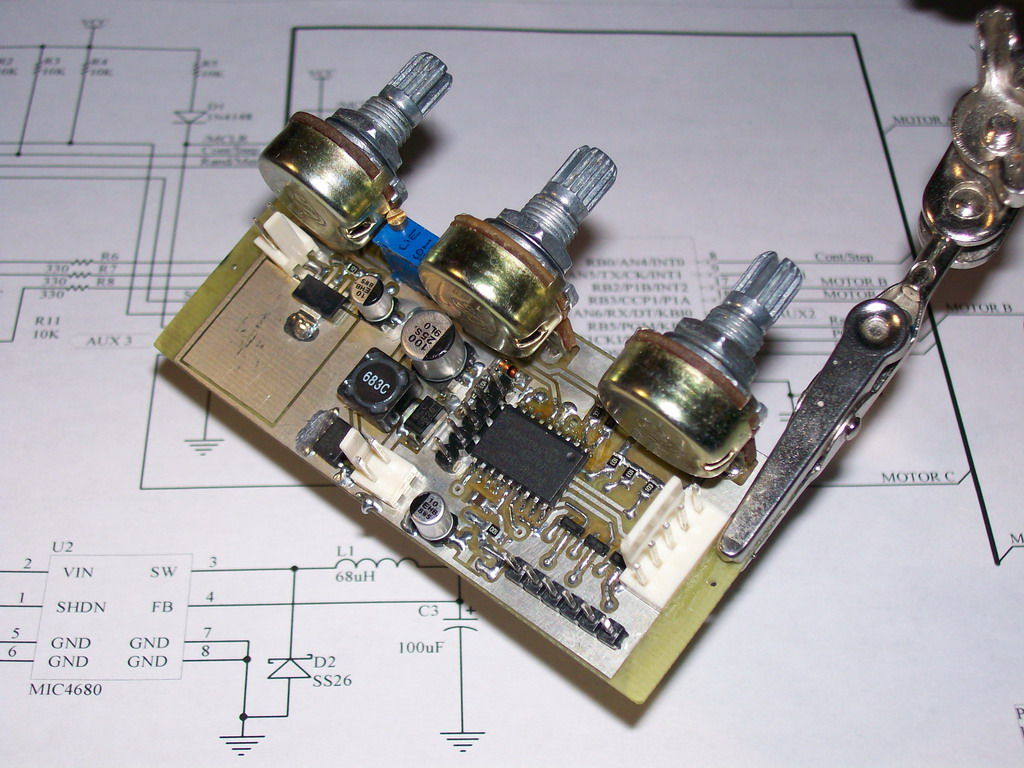
New controller board is completely redesigned with use of SMT components.
5V switching voltage regulator eliminates needs for heatsink. As result controller has became 1.5 times smaller and that provides possibility of making truly pocket version of spirograph.
Embedded voltage regulator for low power laser module provides power within 2 - 4V.
Controller supports 5V and 12V fans. Fan voltage can be set by wire jumpers on board.
Along with auto and manual modes of operation modified controller has ability to store your favorite patterns in internal memory with just press of a button and replay them as a slide show.New controller can store up to 80 user defined patterns and replay them as endless sequence. Time of showing single pattern can vary from 3 to 60 seconds. Also there's manual mode when next pattern in sequence is triggered by a user.
Descriptions of new controls.
Switches:
PROG/CYCLE - selects PROGRAM (manual) or CYCLE (auto) mode of operation.
RAND/MEM - selects subroutine to generate random pattern or reading stored patterns from internal memory.
CONT/STEP - selects CONTINUOUS or STEP mode of showing sequence of patterns.
This switch is active only in MEM mode.
Button STEP/MEM:
- in PROG or CYCLE/RAND modes button writes current pattern in internal memory. Stored patterns can be displayed as slide show in CYCLE/CONT mode.
- in CYCLE/MEM/STEP mode button cycles trough sequence of stored patterns.
If button is being held pressed during powering up all internal memory will be cleared.
POT A:
- in PROG mode defines speed of motor 1.
- in CYCLE/MEM/CONT mode defines time interval ( from 3 to 60 Sec) of showing single pattern from sequence.
POT B:
- in PROG mode defines speed of motor 2.
POT C:
- in PROG mode defines speed of motor 3.
Description of operation.
There are two working modes : PROGRAM (manual) and CYCLE (auto).
In PROGRAM mode, pattern being displayed depends on positions of potentiometers.
Current pattern can be saved in internal memory by pressing button MEM. After 80 patterns have been stored, each new pattern will substitute the oldest pattern.
To clear memory press and hold MEM button during powering up.
In CYCLE mode, unit displays endless sequence of pattern.
In CYCLE/RAND mode, patterns are randomly generated by software. Initial positions of pots determine shape of the first pattern in sequence. Current pattern can by saved in internal memory by pressing button MEM.
In CYCLE/MEM/CONT mode, unit continuously reads patterns to display from internal memory. Time interval for displaying single pattern depends on position of POT A and can vary from 3 to 60 sec.
In CYCLE/MEM/STEP mode, reading of next pattern from memory is triggered by button STEP.
All technical notes such as
- schematic;
- PCB in PDF format;
- BOM;
- HEX file for PIC18F1320;
- C source code for CCS compiler.
Upon request I can provide assembled SMT controller, mirrors and other stuff for this project.
pmls V2_1 (SEP10).zip143 KBStep 4
Attaching mirror to the motor
UPDATE!!!
---
New tutorial "How to balance acrylic mirrors".
www.instructables.com/id/How-to-mount-and-balance-mirrors-for-spirograph-pr/
---
Acrylic mirror is very light, so double sided sticky foam tape will do job.
Piece 1/2 x 1/2 is working good.
You can use thick paper as a wedge to tilt mirror. Insert it between mirror and motor.
In my setup tilt is 2-3 degrees. It results 6' wide pattern at a distance 18'.
It's impossible to center mirror properly regarding motor shaft and even slight offset will cause
vibration and noise at high speed, so I've developed some tricks for mirror balancing.
Make sure your safety glasses still on.
WARNING!!! This method will work only for acrylic/plastic mirrors!!!
At first I've tried to shape spinning mirror with file but fan is low torque device, so even light pressure with tool forced motor to full stop.
Since idea with turning part and fixed tool has failed, I've tried opposite approach -
Dremel with 1/2" sanding drum against motionless mirror, and that's really worked.
Some advices for people who wants to follow.
Motor with mirror must be off.
Select sanding band with coarse grit.
Set Dremel to minimal speed.
Hold Dremel that axes of tool and motor shaft are parallel.
Slowly bring sanding drum to the edge of mirror and press against it. Don't put much pressure. Spinning tool will rotate mirror and file it at the same time.
Take your time, go easy and, if you have enough patience, you'll get perfect round mirror which will run smooth and quiet.
For more detail: Laser show for poor man using PIC18F1220 microcontroller
Quick Solutions to Questions related to Laser show for poor man:
- How does the microcontroller control the laser patterns?
The PIC microcontroller uses a pseudo-random algorithm in automatic mode or reads analog inputs from potentiometers in manual mode to modify PWM signals for the motors. - Can I use a different microcontroller than the PIC18F1220?
Yes, the PIC18F1320 can be used as it is pin-compatible, but it requires a new HEX file as the old one will not work. - What is the best way to balance the acrylic mirror on the motor?
You can use a Dremel with a sanding drum against a motionless mirror while holding the tool axes parallel to the motor shaft to file the edge until it runs smooth. - Does the controller support both manual and automatic operation?
Yes, the device has two modes: manual where operators twist potentiometers to control motors, and automatic which generates unique nonrepetitive patterns. - How many patterns can the updated V2 controller store?
The updated V2 controller can store up to 80 user-defined patterns in its internal memory. - What determines the duration of a single pattern in cycle mode?
In CYCLE/MEM/CONT mode, the time interval for showing a single pattern varies from 3 to 60 seconds based on the position of POT A. - How do you power the green laser module safely?
A LM317-based voltage regulator is used to adjust the output voltage between 2 and 4V, ensuring compatibility with pointers rated from 3V to 4.5V. - Can the stored patterns be displayed as a slideshow?
Yes, the V2 controller allows stored patterns to be replayed as an endless sequence or stepped through manually depending on the switch settings.
Related projects
Single-Axis PIC Controlled Solar Tracker DIY Kit using PIC18F1220
Single-Axis PIC Controlled Solar Tracker DIY Kit Hi All I'm not going into as much depth with this instructable due to my...
Audio, Sound & Radio · PIC18F1320PIC sound player (PCM to PWM converter) using PIC18F1320
Description This project makes a PIC microcontroller play audio PCM sounds using PWM modulation! Pulse-code modulation (PCM) is a digital representation of...
LED Projects · PIC18F1220PicPOV – Persistence of Vision with a PIC18F1220
Description PicPOV is a project based on "persistence of vision". A PIC microcontroller blinks 8 LEDs on and off so that when...
Sensors & TemperatureSpectrum Analyzer using TMS320F28023DA with Proteus Simulation
Introduction This project demonstrates a real-time audio spectrum analyzer using the TMS320F28023DA Piccolo microcontroller, simulated in Proteus VSM. The system captures an...
Sensors & TemperatureDHT22 Low Cost Humidity Sensor using PIC18F25K20 with Proteus Simulation
IntroductionThis microcontroller project demonstrates how to interface a DHT22 (RHT03) digital temperature and humidity sensor with a PIC18F25K20 using Proteus simulation.The project...
Sensors & TemperatureCrafting a Microcontroller-Based Temperature Monitoring System
Abstract As technological advancements progress, processes become increasingly intricate, demanding a corresponding expansion in the parameters necessary for efficient analysis. Data acquisition,...

Ibrar Ayyub
I am an experienced technical writer holding a Master's degree in computer science from BZU Multan, Pakistan University. With a background spanning various industries, particularly in home automation and engineering, I have honed my skills in crafting clear and concise content. Proficient in leveraging infographics and diagrams, I strive to simplify complex concepts for readers. My strength lies in thorough...