
Summary of Interfacing PIR sensor to 8051
This article details the interfacing of a PIR sensor with an 8051 microcontroller to create a motion-detecting intruder alarm. It explains the sensor's operation using pyro-electric materials and provides specific hardware connections, including reset and oscillator circuits. The text includes a C-like assembly program that monitors the sensor output to toggle an LED, demonstrating how the system detects motion and triggers an alert based on voltage changes.
Parts used in the Interfacing PIR sensor to 8051:
- DSN-FIR800 PIR sensor module
- 8051 Microcontroller
- LED
- Transistor Q1
- Resistor R1
- Resistor R2
- Resistor R3
- Capacitor C1
- Capacitor C2
- Capacitor C3
- Capacitor C4
- Crystal X1
- Push button switch S1
PIR sensors are widely used in motion detecting devices. This article is about interfacing a PIR sensor to 8051 microcontroller. A practical intruder alarm system using PIR sensor and 8051 microcontroller is also included at the end of this article. Before going in to the core of the article, let’s have a look at the PIR sensor and its working.
PIR sensor.
PIR sensor is the abbreviation of Passive Infrared Sensor. It measures the amount of infrared energy radiated by objects in front of it. They does not emit any kind of radiation but senses the infrared waves emitted or reflected by objects. The heart of a PIR sensor is a solid state sensor or an array of such sensors constructed from pyro-electric materials. Pyro-electric material is material by virtue of it generates energy when exposed to radiation.Gallium Nitride is the most common material used for constructing PIR sensors. Suitable lenses are mounted at the front of the sensor to focus the incoming radiation to the sensor face. When ever an object or a human passes across the sensor the intensity of the of the incoming radiation with respect to the background increases. As a result the energy generated by the sensor also increases. Suitable signal conditioning circuits convert the energy generated by the sensor to a suitable voltage output. In simple words the output of a PIR sensor module will be HIGH when there is motion in its field of view and the output will be LOW when there is no motion.
 DSN-FIR800 is the PIR sensor module used in this project.Its image is shown above. It operates from 4.5 to 5V supply and the stand by current is less than 60uA. The output voltage will be 3.3V when the motion is detected and 0V when there is no motion. The sensing angle cone is 110° and the sensing range is 7 meters. The default delay time is 5 seconds. There are two preset resistor on the sensor module. One is used for adjusting the delay time and the other is used for adjusting the sensitivity. Refer the datasheet of DSN-FIR800 for knowing more.
Interfacing PIR sensor to 8051.
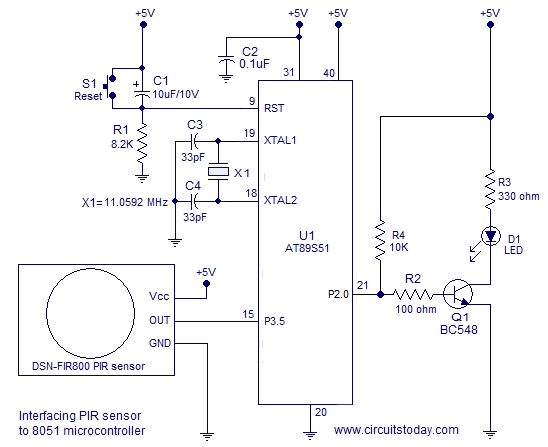
The 8051 considers any voltage between 2 and 5V at its port pin as HIGH and any voltage between 0 to 0.8V as LOW. Since the output of the PIR sensor module has only two stages (HIGH (3.3V) and LOW (0V)) , it can be directly interfaced to the 8051 microcontroller.
The circuit shown above will read the status of the output of the PIR sensor and switch ON the LED when there is a motion detected and switch OFF the LED when there is no motion detected. Output pin of the PIR sensor is connected to Port 3.5 pin of the 8051. Resistor R1, capacitor C1 and push button switch S1 forms the reset circuit. Capacitors C3,C4 and crystal X1 are associated with the oscillator circuit. C2 is just a decoupling capacitor. LED is connected through Port 2.0 of the microcontroller. Transistor Q1 is used for switching the LED. R2 limits the base current of the transistor and R3 limits the current through the LED. Program for interfacing PIR sensor to 8051 is shown below.
Program.
PIR EQU P3.5
LED EQU P2.0
ORG 00H
CLR P2.0
SETB P3.5
HERE:JNB PIR, HERE
     SETB LED
HERE1:JB PIR,HERE1
      CLR LED
SJMP HERE
END
The status of the output of the PIR sensor is checked using JNB and JB instructions. Code “HERE:JNB PIR, HERE” loops there until the output of the PIR sensor is HIGH. When it becomes HIGH it means a motion detected and the program sets P2.O HIGH in order to make the LED ON. The output pin of the PIR sensor remains HIGH for 5 seconds after a motion is detected. Code”HERE1:JB PIR,HERE1″ loops there until the output of the PIR sensor becomes LOW. When it becomes LOW the loop is exited and Port 2.0 is made LOW for switching OFF the LED. Then the program jumps back to label “HERE” and the entire cycle is repeated.
For more detail: Interfacing PIR sensor to 8051
- How does a PIR sensor detect motion?
The sensor measures infrared energy radiated by objects; when an object passes across its field of view, the radiation intensity increases, generating more energy. - What voltage range does the DSN-FIR800 operate from?
The module operates from a supply voltage between 4.5 to 5V. - Can the PIR sensor output be directly connected to the 8051 microcontroller?
Yes, because the sensor outputs 3.3V for HIGH and 0V for LOW, which falls within the 8051 logic levels. - Which pin of the 8051 is connected to the PIR sensor output?
The output pin of the PIR sensor is connected to Port 3.5 of the 8051 microcontroller. - What is the default delay time of the DSN-FIR800 sensor?
The default delay time is set to 5 seconds. - How can you adjust the sensitivity of the sensor?
You can adjust the sensitivity using one of the two preset resistors located on the sensor module. - What components form the reset circuit in this project?
Resistor R1, capacitor C1, and push button switch S1 form the reset circuit. - Does the PIR sensor emit any kind of radiation?
No, the sensor does not emit any kind of radiation but senses infrared waves emitted or reflected by objects.

