


Summary of Universal High-Power LED Driver with 3D-printable Case using PIC16F1823
This article details an open-source, universal high-power LED driver designed for DIY lighting projects. It features a PIC16F1823 microcontroller to manage constant current, dimming via analog or digital signals, and IR remote control. The circuit supports buck-boost and boost modes with a 5–18V input range, delivering up to 20W. It offers flexible configurations for 1–20 LEDs, ensuring flicker-free operation at high frequencies suitable for video recording.Parts used in the Universal High-Power LED Driver:
- PIC16F1823 Microcontroller
- Inductor (switch mode controller)
- Analog dimmer control interface
- IR remote receiver (Sony compatible)
- External microcontroller interface (e.g., Arduino)
- Master/slave gang dimming connection ports
- 3D printable enclosure
- LED mounting hardware
*** There's a firmware update. Please check out! ***
LEDs are taking over conventional lighting every day. High-power LEDs over 1W are becoming more and more affordable, and I wanted to start using them to replace the lighting fixtures around me. However I realize that finding and configuring the power supply was a bit of a pain, since I wanted to use different LEDs in different configurations depending on what the lighting was for. Power supply needs to regulate the current that goes though the LEDs. With higher current that high-power LEDs require, active constant current circuit is the only practical option. Commercially available buck regulators are easy to use, however, they are usually made for a specific current and voltage range. For me that means having to purchase variety of buck drivers.
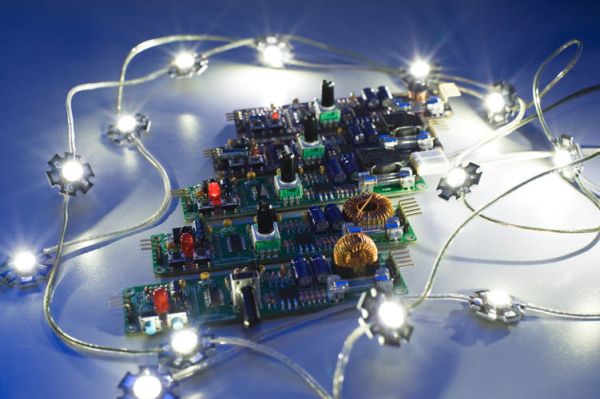
Also, most of LED drivers lack dimming function, or have poorly functioning dimmers. I think dimming is essential for modern lighting, and I want smooth control of brightness.
So I decided to develop a universal, dimmerable high-power LED controller. It has taken me four months to develop this controller. Although it's still in development, I think it's quite useful to all DYI'ers with LED lighting projects.
I made this an Open Source project. Both hardware and software are open - please use, and extend this project and share the knowledge. A 3D printable enclosure as well as couple of LED mounting hardware is also available as Open Source, download-able at Thingverse. Together you can really kick start LED conversion of your household lighting!
Here's the list of main features:
- Inductor "switch mode" controller for high energy efficiency.
- Wide supply voltage range of 5 to 18V (can go higher, but not tested). Great with batteries as well as AC adapters.
- Up to 20W maximum output power (can go higher with active cooling). (at supply voltage 12V or above)
- Constant current (pulsed) - configurable up to 3A peak current.
- Selectable between buck-boost and boost mode.
- Analog style dimmer control (smooth, flicker-free continuous adjustment)
- IR remote receiver - controllable via Sony IR remote control
- Digitally controlled dimming - via external microcontroller including Arduino.
- Master/slave gang dimming - connect multiple units together and control the dimming from any one of the units.
- High frequency pulse drive - 32kHz to 175kHz - no flicker even in video!
This circuit is a relatively straightforward implementation of switch mode voltage converter. An inductor works to convert electric energy into magnetic energy, then it converts back to electric energy. By controlling the charge time you can control the output voltage.
My implementation is a bit different from typical boost or buck-boost circuit in that, instead of rectifying the output voltage, the output voltage drives LEDs directly (pulsed drive). This implementation provides a few advantages:
- Reduced part count.
- Higher overall energy efficiency (because rectifier has voltage loss)
- Better dimming characteristic.
In practice, you can connect 1 to 20 LEDs to the controller. Depending on the supply voltage you can choose between buck-boost or boost mode.
Buck-boost mode can supply output voltage lower and higher than the input voltage. However, efficiency suffers at higher output voltage, so boost mode should be used when you need higher output voltage than input.
Boost mode can only supply output voltage higher than input. As LEDs need minimum voltage (usually about 2V per LED) to start lighting, boost mode is effective when supply voltage is below 2 x (number of LEDs).
More on configuration later...
Peeking into the Output
I think looking at the waveforms will give you the best understanding of how this circuit drives the LEDs. As you can see in the picture, the unit is hooked up to an oscilloscope. Using two inputs, output voltage and the inductor/LED current are shown simultaneously.
The squarish wave is the voltage, and triangular wave is the current.
Notice how at the low power/dimmed level, both the current and the duty rate are low. As you increase the power level, both the current and the duty rate increases. This scheme results in a very wide dimming range with minimum color shift.
For more detail: Universal High-Power LED Driver with 3D-printable Case using PIC16F1823
Quick Solutions to Questions related to Universal High-Power LED Driver:
- What is the maximum output power of this controller?
The unit provides up to 20W maximum output power at supply voltages of 12V or above. - How can I control the brightness smoothly?
Brightness can be controlled via analog style dimming or digitally through an external microcontroller like Arduino. - Can this driver work with batteries?
Yes, it accepts a wide supply voltage range of 5 to 18V, making it suitable for both AC adapters and batteries. - Does the device support dimming without flicker?
It uses high frequency pulse drive between 32kHz and 175kHz to ensure no flicker even in video. - How many LEDs can be connected to this driver?
You can connect between 1 and 20 LEDs depending on the supply voltage and chosen mode. - What happens if the output voltage needs to be higher than the input?
You should select boost mode, which supplies output voltage higher than the input voltage. - Is the hardware and software open source?
Yes, both hardware and software are open source, along with 3D printable enclosures available on Thingverse. - Can multiple units be controlled together?
Yes, you can connect multiple units in master/slave gang dimming to control brightness from any single unit.
Related projects
Universal High-Power LED Driver – Firmware update using PIC16F1823
Here's the updated firmware for my Universal High-Power LED Driver. This version has on-board current set up function, so you can change...
Development Boards & Kits · PIC16F18234 Channel DMX512 Driver for PIC16F1823
The original DMX512 driver project #800 is now redesigned to incorporate the optional address configuration switch on the main PCB. The no-switches...
Power & Battery · PIC16F1823Digital Controlled Linear Power Supply
In myteenage years, about 40 years ago, I created a dual linear power supply. I got the schematic diagram from a magazine...
LED ProjectsAn Application-Driven Microcontroller Curriculum
Understanding how to apply microcontrollers lies at the core of modern embedded systems education. This student project takes an experiential approach to...
LED ProjectsBuild this microcontroller controlled rainbow flying disc – and then throw it!
Hello all and welcome to this super simple and inexpensive instructable. If you like throwing frisbees AND you like flashing lights AND...
LED ProjectsLED Scrolling Display Project Working With Circuit Diagram
We normally use a simple static LED display screen to convey a message. Earlier, when we want to display large data, we...

Ibrar Ayyub
I am an experienced technical writer holding a Master's degree in computer science from BZU Multan, Pakistan University. With a background spanning various industries, particularly in home automation and engineering, I have honed my skills in crafting clear and concise content. Proficient in leveraging infographics and diagrams, I strive to simplify complex concepts for readers. My strength lies in thorough...