


Intro
Here you can find all resources you need to build your own in-circuit serial PIC16F87X programmer.
After experimenting with the PIC16F84, time had come to move on to more powerful devices, such as the PIC16F871.
These devices offer a low voltage progamming (LVP) mode. This basically means that it is possible to modify the contents of the program memory without applying a high voltage (12 V) to the device.
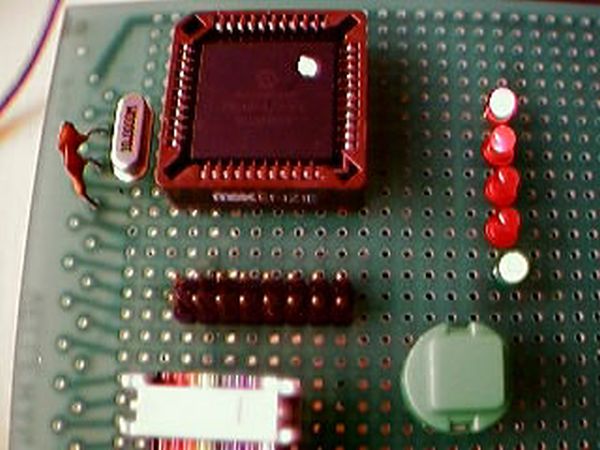
Being used to the remove-plug-burn-remove-plug-test programming method of the 16F84, I decided to build my own ICSP (in-circuit serial programmer).
Description
Features:
- Able to program devices from the PIC16F87X family
- Uses RS232 (serial port) to communicate to a host (computer, HP48, ...)
- Software runs under Win98, NT4.0, Win2000. No support for Linux yet 🙁
- Programmer is powered from the target circuit, no extra power supply needed
- Programs a full 16F871 (2k instructions) in under 35 seconds
- Can erase code protected devices
- Stays connected to the development board during code tests
Interface:
The programmer communicates to a host through a serial port. All commands are character-based. The serial port settings are: 9600 bps, 8 databits, no parity and 1 stop bit (9600, 8N1). When a command is finished, the programmer returns 'OK'.
Overview of the instruction set:
- R
- Read the contents of the program memory (PM). This command must be followed by the highest address that has to be read.
E.g. R0078 will dump the contents of the address range 0x0000 to 0x0078 of the PM to the serial port.
- I
- Dump the contents of the configuration memory to the serial port. Configuration memory extends from location 0x2000 up to 0x2007 with the first 4 locations containing the ID locations, location 0x2006 containing the device ID and the last location describing the configuration word.
- X
- Bulk erase the device.
- H
- Remove code protection from the device. When the code protection bits are set in the configuration word, all PM locations read as 0x00. All further programming of the device becomes impossible. It is advisable to first send this command to the device you want to program before attempting any other programming.
WARNING: All memory contents will be erased if the device was under code protection.
- 1 (one)
- Put the device in run mode.
- 0 (zero)
- Put the device in reset mode.
- P
- Enter program mode. This command must be followed by a wait of 100 ms. Then you can choose the following options:
- P
- Program the PM of the device. This command must be followed by a sleep of 100 ms. Then you can start sending lines of the hex file to the programmer. The leading semicolumn must be removed. If the programmer encounters a CRC error in the received data, it will raise the error flag (corresponding LED on the programmer will light up). After this error, a hard reset has to be performed. If no error is encountered, the programmer will transfer the data to the device under programming and burn it in flash. After successfully completing this task it will return a '1' (one) to the host to designate it is ready to receive the following line of data. This process will stop after an 'end-of-file' line is received ('00000001FF').
- C
- Program the configuration locations of the device. The configuration locations comprise the ID locations and the configuration word. They are sent in the following format: 0540000000 + ID0 + 00 + ID1 + 00 + ID2 + OO + ID3 + config word + CRC.
The CRC is the value one has to add to the sum of all 8-bits hex values of the line to obtain zero. E.g. the line 0500240528 has CRC AA because 05 + 00 + 24 + 05 + 28 + AA equals 0x100. The leading bits are removed (overflow), so this results in 0x00.
Programmer firmware
Current version of the firmware is 1.04.
You can download the flash-and-burn hex file (4 kB).
Host software
Current stable version is 0.2. It completely supports programming PIC16F87X devices. Read and verify operations are not supported by the software yet. The complete host software setup package for the picprogrammer.
If you only need the executable file, e.g. when you are upgrading from a previous version, pick it here (24 kB, zipped).
David Rojas kindly provided the software with some updates. Latest development release is v0.4. Download the complete VB project source code here (zipped, 72 kB). Changelog
For more detail: In circuit serial programmer for PIC16F87X
Related projects
PIC Stepper Motor Controller using PIC16F84A with Proteus Simulation
Introduction Stepper motors are widely used in embedded systems and DIY electronics projects where precise position control is required. This PIC Stepper...
Programmers & ICSP · PIC16F84APIC Musical Doorbell using PIC16F84A with Proteus Simulation
IntroductionThis microcontroller project demonstrates a musical doorbell built around a PIC16F84A and a simple piezo sounder.Using two push buttons, the system allows...
Beginner Tutorials · PIC16C84Exploring the World of PIC Microcontrollers: An Architectural Overview
A Peripheral Interface Microcontroller (PIC), developed by General Instruments Microcontrollers in 1993, operates under software control and is programmed to execute various...
Programmers & ICSPCalculator Test using PIC24FJ64GA006 with Proteus Simulation
Introduction The Calculator Test using EASYHDL is a practical microcontroller project built on the PIC24FJ64GA006 and simulated in Proteus. This project demonstrates...
Programmers & ICSPPID Controlled Oven using TMS320F28027PT with Proteus Simulation
IntroductionThis project demonstrates a PID controlled oven implemented using a PICCOLO TMS320F28027PT microcontroller and verified through Proteus simulation.It is a practical microcontroller...
Programmers & ICSPPICCOLO Motor Controller Sample Design using TMS320F28023PT with Proteus Simulation
IntroductionThis project demonstrates a PICCOLO motor controller sample design implemented using the TMS320F28023PT Piccolo microcontroller and tested through Proteus simulation. It focuses...

Ibrar Ayyub
I am an experienced technical writer holding a Master's degree in computer science from BZU Multan, Pakistan University. With a background spanning various industries, particularly in home automation and engineering, I have honed my skills in crafting clear and concise content. Proficient in leveraging infographics and diagrams, I strive to simplify complex concepts for readers. My strength lies in thorough...