


Summary of Alarm Clock using PIC16F74 microcontroller
This project is a PIC-based alarm clock designed by the author for their son. It features two interlinked vero-board cards: one housing the power regulator, display processor (PIC 16F74), real-time clock (DS1307), backup battery, and buzzer; the other serving as the main interface. The system uses I2C communication to read time from the DS1307, with the PIC handling alarms and settings stored in the RTC's memory. Due to hardware limitations, the author implemented a 'bit-banged' approach for I2C master functionality since the chip's SSP module was unsuitable.Parts used in the Alarm Clock using PIC16F74 microcontroller:
- PIC 16F74 microcontroller
- Dallas DS1307 real time clock
- 5V power regulator
- 3V backup battery
- Buzzer
- 4MHz resonator with built-in load capacitors
- Two interlinked vero-board cards
- LEDs
- Switches
The idea for this project came from my youngest son who asked me to make him an alarm clock. I put together a simple PIC based design comprising of two interlinked vero-board cards. The design was created using New Wave Concepts' LiveWire which allows you to simulate the effect of the signals on the components - very useful it you are new to electronics like me - If only it could simulate the PIC too!.
The larger of the two circuit boards holds the 5V power regulator, the display processor (a PIC 16F74), the real time clock (Dallas DS1307), 3V backup battery and buzzer. Click here to see a copy of the schematic for the base board in a popup window.
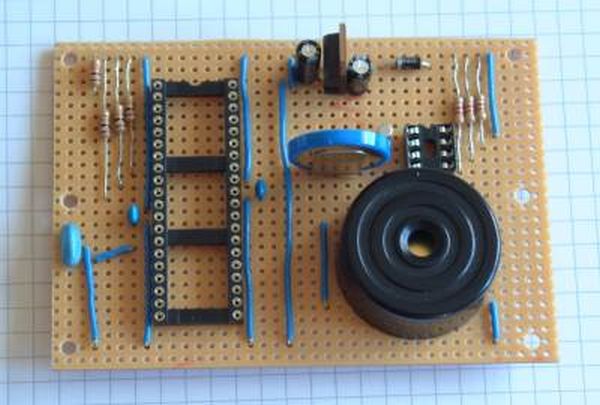
The PIC board looked like this before fitting the ICs and LED/switch wire connections. It is also missing the 1Hz signal, I2C clock and I2C data connections between the PIC and RTC chips. ---I used a 4MHz resonator with built in load capacitors instead of the crystal and separate capacitors shown on the schematic. Also I added one more link wire after taking this photo to connect GND to -ve terminal of the backup battery. (The copper tracks run left-to-right on this board with cuts between the IC pins and in a couple of other strategic places.
The PIC microcontroller is programmed to read the real-time clock using I2C serial communication several times a second and update the display. It does no time keeping itself. Even the pulsing central pair of LEDs are driven by the real time clock (by means of a 1Hz output signal) and which is read by the PIC.
The PIC performs two other functions; it compares the time against the alarm settings to determine when it should go off and also handles time, date and alarm setting. The 16F74 has no EEPROM of its own so all the settings are stored in the DS1307 and read at power-on-reset. I was planning to mount connectors on the board for all the switch and display wires but in the end there wasn't enough room so I soldered the wires directly
I ordered a 16F74 microcontroller from Farnell because it had more than enough I/O pins and supported I2C on chip. After I received the chip and read the small print in the data sheet I discovered that the SSP module was only really suitable for an I2C slave. What I really needed was a MSSP module. So my code disables the SSP module and generates the I2C master clock and data signals (on the RC3/SCL and RC4/SDA pins) using a 'bit-banged' approach.
For more detail: Alarm Clock using PIC16F74 microcontroller
- What software was used to simulate the circuit design?
New Wave Concepts' LiveWire was used to simulate the effect of signals on components. - How does the PIC microcontroller handle time keeping?
The PIC does not keep time itself but reads the real-time clock using I2C serial communication several times a second. - Why did the author use a bit-banged approach for I2C?
The author disabled the SSP module because it was only suitable for an I2C slave, so they generated master clock and data signals manually. - Where are the alarm settings and time stored?
All settings are stored in the DS1307 and read at power-on-reset because the 16F74 has no EEPROM of its own. - What signal drives the pulsing central pair of LEDs?
The pulsing LEDs are driven by the 1Hz output signal from the real time clock. - Can this project be simulated completely in LiveWire?
No, the article states that while LiveWire simulates signals well, it cannot simulate the PIC itself. - How were the switch and display wires connected to the board?
The wires were soldered directly to the board because there was not enough room to mount connectors.
Related projects
Adaptive Alarm Clock: Build a Smart, User-Centric wake-Up system
Project Overview The goal of this ambitious undergraduate project was to develop a novel alarm clock capable of analyzing a person's unique...
Clocks & TimersDesigning Your Ideal Alarm Clock: An Introduction to PIC18
Within this laboratory session, you'll employ the C language to create an alarm clock, delving into the implementation of "C" programs on...
Clocks & TimersBuilding your Dream Alarm Clock Using the PIC18
Objective: In this laboratory session, your objective is to create an alarm clock using the C programming language. You will gain proficiency...
Clocks & TimersBuild a DIY Smart Watch Using Microcontroller
Introduction Wearables (Smart Watch) are becoming increasingly more prevalent in today's markets; however cost continues to limit the demand for such devices....
Clocks & Timers · PIC16F84AIN-8 single nixie tube clock using PIC16F84
After receiving one IN-8 tube from a friend (thanks), I decided to build myself a clock. This clock is more an ornament...
Clocks & Timers · PIC16F84APIC16F84A timer0 code and Proteus simulation
This post provides the timer0 code for PIC16F84A microcontroller. This code is written in C language using MPLAB with HI-TECH C compiler....

Ibrar Ayyub
I am an experienced technical writer holding a Master's degree in computer science from BZU Multan, Pakistan University. With a background spanning various industries, particularly in home automation and engineering, I have honed my skills in crafting clear and concise content. Proficient in leveraging infographics and diagrams, I strive to simplify complex concepts for readers. My strength lies in thorough...