Summary of 3D PRINTED MOON LITHOPHANE LAMP
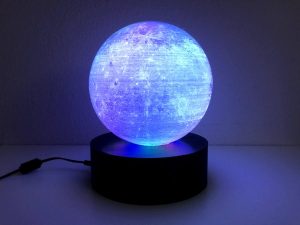
Lithophanes are thin translucent porcelain or 3D-printed artworks that reveal detailed images when backlit. Created by converting a 2D image to grayscale and mapping pixel brightness to varying thickness, darker areas become thicker to block more light. Good contrast images work best. Modern workflows export STL files for high-resolution printing (SLA or FDM). Example: Tiffany Lo used Lithophane Maker’s Globe Maker, NASA moon data, Fusion 360, an FDM-printed sphere, and LED strips on a base to make a 3D-printed Moon lithophane lamp.
Parts used in the 3D-printed Moon lithophane lamp:
- Lithophane Maker Globe Maker (software)
- Fusion 360 (software)
- NASA Moon data (image/heightmap source)
- FDM 3D printer
- Printed sphere (moon lithophane)
- Base for sphere assembly
- LED strips for backlighting
Lithophanes are artistic creations on ultra-thin translucent porcelain that is visible only when backlit with a light source. They are etched or modeled artworks made by a 2D image. The 2D image is first processed to make its gray-scale representation, and then, depending on the color, it is then converted to a calculated 3D printed height. This process allows a specific amount of light to shine through. The darker colors block more light, and the opposite relationship stands for lighter pixels. Each pixel in the image undergoes this process and results in a very creative art piece. This varying light source is what makes lithophanes interesting to the viewer than the 2D engravings or images.
Lithophanes are a 3D representation of photos that can make creative gifts for any occasion. It’s also a way to highlight your 3D printing skills that are not familiar to everyone. The process of creating lithophanes includes initially converting a 2D image into a gray-scale and make the detail levels to maximum. The “Make Lithophane” action is also available on Adobe Photoshop that will allow you to create gray-scale images suitable for lithophanes. Then STL file is exported that is 3D printed by a high-resolution stereolithography (SLA) printer.
One of the most important aspects to keep in mind while making lithophanes is the color contrast. The selection of the right picture that has a variety of color contrast is highly critical. A dark picture (one with a lot of deep colors) might make the details of the finished product hard to see. Therefore, an image with a good combination of light and dark colors is desirable for generating an excellent lithophane. The surface of the Moon is a good choice for making a lithophane.
Tiffany Lo recently demonstrated by an Instructable how to make a 3D-printed Moon lithophane. The project uses Lithophane Maker’s Globe Maker and Fusion 360 design to create a colorful moon image. Tiffany combined the NASA data of the Moon and with the globe maker. The sphere was 3D printed on a typical FDM printer. Then assembled the printed globe on a base with LED strips for backlighting.
Read more: 3D PRINTED MOON LITHOPHANE LAMP
- What is a lithophane?
A lithophane is an ultra-thin translucent artwork that becomes visible when backlit, created by mapping a 2D image to varying thickness so light passes differently through darker and lighter areas. - How is a 2D image converted into a lithophane?
The 2D image is converted to grayscale, detail levels are maximized, then grayscale values are converted to calculated 3D heights and exported as an STL for 3D printing. - Which printers are used to make lithophanes?
Lithophanes can be printed on high-resolution stereolithography SLA printers or typical FDM printers, as in the Moon project. - What kind of image works best for a lithophane?
An image with a good combination of light and dark contrast works best; images with many deep dark colors may lose detail in the finished lithophane. - What software was used to create the Moon lithophane?
The project used Lithophane Maker’s Globe Maker and Fusion 360 to create the design. - Where did the moon imagery come from for the project?
The project combined NASA data of the Moon with the Globe Maker to create the lunar image. - How was the Moon lithophane lit?
The printed sphere was assembled on a base with LED strips used for backlighting. - Can a lithophane be printed on an FDM printer?
Yes; the Moon lithophane sphere was 3D printed on a typical FDM printer.