


Summary of pickit 3 pinout – connection diagram
Microchip PICkit 3 is a low-cost, USB-connected in-circuit debugger and programmer for PIC and dsPIC Flash microcontrollers, compatible with MPLAB IDE. It supports ICSP via a 6-pin RJ-11-compatible connector, real-time execution, firmware upgrades, and voltages from 1.8V–5.0V. Features include over-voltage/short-circuit protection, diagnostic LEDs, memory read/write and erase with verification, breakpoint peripheral freeze, and Programmer-to-Go for up to 512 K-byte flash.Parts used in the Pickit 3 Project:
- PICkit 3 In-Circuit Debugger/Programmer unit
- Full-speed USB cable (for PC connection)
- 6-pin ICSP cable (RJ-11 compatible)
- Target board with PIC or dsPIC Flash microcontroller
- Target board ICSP 6-pin connector
- Power source via PC USB port
- Diagnostic LEDs on PICkit3 (power, active, status)
Pickit 3 Description
Microchip's PICkit3 In-Circuit Debugger/Programmer utilizes in-circuit debugging logic integrated into each chip with Flash memory, offering a low-cost hardware debugger and programmer for PICkit 3 ICSP connections.
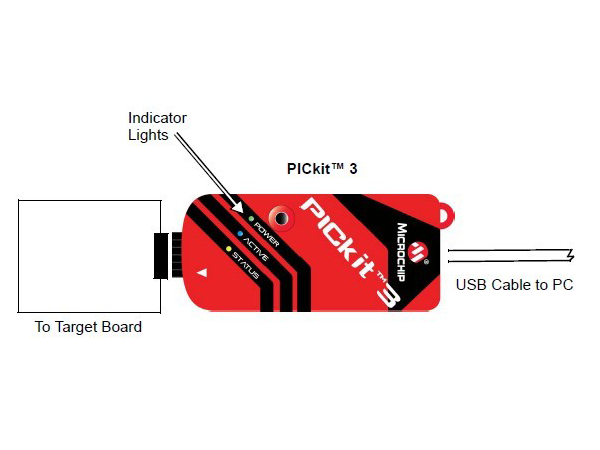
The MPLAB PICkit3 allows debugging and programming of PIC® and dsPIC® Flash microcontrollers at a most affordable price point using the powerful graphical user interface of the MPLAB Integrated Development Environment (IDE). The MPLAB PICkit3 is connected to the design engineer's PC using a full-speed USB interface and can be connected to the target via a Microchip debug (RJ-11) connector (compatible with MPLAB ICD 2, MPLAB ICD 3, and MPLAB REAL ICE). The connector uses two device I/O pins and the reset line to implement in-circuit debugging and In-Circuit Serial Programming™.
Pickit 3 Features
- Full-speed USB support using Windows standard drivers
- Real-time execution
- Processors run at maximum speeds
- MPLAB IDE compatible (free copy included)
- Built-in over-voltage/short circuit monitor
- Firmware upgradeable from PC/web download
- Totally enclosed
- Supports low voltage to 5 volts (1.8v to 5.0v range)
- Diagnostic LEDs (power, active, status)
- Read/write program and data memory of the microcontroller
- Erase of all memory types (EEPROM, ID, configuration, and program) with verification
- Freeze peripherals at the breakpoint
- Program up to 512 K-byte flash with the Programmer-to-Go
Pickit 3 Basic Debugger System
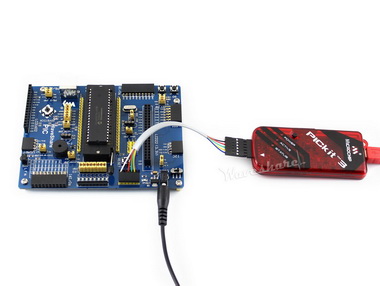
The debugger system can be configured to use standard ICSP communication for both programming and debugging functions.
CAUTION: Do not change hardware connections while the PICkit3 or target is powered.
Pickit 3 pinouts connection diagram
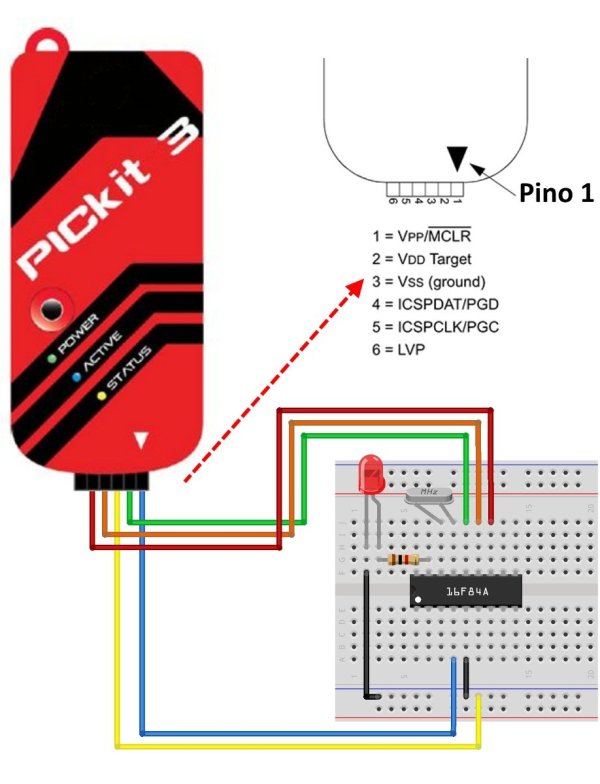
Connecting the PICkit3 to the target board through the standard ICSP interface using a 6-pin connector. The programmer connector pinout is shown in the figure below:
Be careful with the pin order while connecting.
An incorrect connection may damage the PICkit3 debugger/programmer or the target board.
PICkit3 Status LEDs
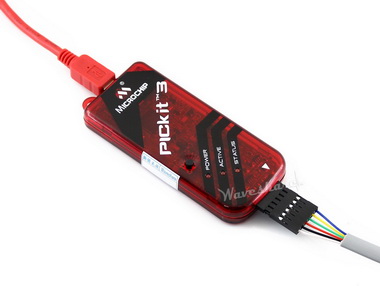
The Status LEDs indicate the status of the PICkit3.
- Power (green) – The USB port supplies power to the PICkit3.
- Active (blue) – The PICkit3 has a connection to the PC USB port, and the communication link is active.
- Status:
Busy (yellow) – The PICkit3 is busy with a function in progress, such as programming.
Error (red) – The PICkit3 has encountered an error.
Downloads
Development resources: software, datasheets, etc.
Wiki: www.waveshare.com/wiki/PICkit3
Quick Solutions to Questions related to Pickit 3:
- What is the Pickit 3 used for?
It is used as a low-cost in-circuit debugger and programmer for PIC and dsPIC Flash microcontrollers using ICSP. - How does the Pickit 3 connect to the PC?
It connects to the PC using a full-speed USB interface. - Can the Pickit 3 program devices at low voltages?
Yes, it supports low voltage operation from 1.8 volts to 5.0 volts. - What connector is used to attach the Pickit 3 to the target?
The target is connected via a Microchip debug RJ-11 compatible 6-pin ICSP connector. - Does the Pickit 3 support firmware upgrades?
Yes, its firmware is upgradeable from PC or web download. - What do the PICkit3 status LEDs indicate?
Power (green) shows USB power, Active (blue) indicates PC USB communication, Status yellow shows busy, and red indicates an error. - Can the Pickit 3 erase and verify microcontroller memory?
Yes, it can erase all memory types including EEPROM, ID, configuration, and program with verification. - Is the Pickit 3 compatible with MPLAB IDE?
Yes, it is MPLAB IDE compatible and uses the IDE for programming and debugging. - What precaution should be taken when connecting hardware?
Do not change hardware connections while the PICkit3 or target is powered to avoid damage.
Related projects
Download Legacy MPLAB IDE 8 from Microchip
The original MPLAB® IDE 8 series is still relevant when maintaining older PIC® and dsPIC® projects that were created before MPLAB X...
IDEs & CompilersHow to Download MPLAB X IDE Safely
MPLAB® X IDE is used for developing, building, debugging and programming embedded applications across several Microchip device families. For an active firmware...
IDEs & CompilersDownload MPLAB IDE v8.92 from Microchip
MPLAB® IDE v8.92 belongs to the final generation of the original MPLAB IDE 8 development environment. It still appears in older PIC®...
IDEs & CompilersSoftware UART (SoftUART) using TMS320F28027 Piccolo with Proteus Simulation
IntroductionCreating reliable serial communication without a hardware UART might sound tricky, but this SoftUART project proves how flexible embedded systems can be....
IDEs & CompilersMastering PIC 24F Series: A Comprehensive Guide with MPLAB and Proteus
Introduction The field of embedded systems plays a crucial role in modern society, with a myriad of applications across various sectors such...
IDEs & CompilersDigital Clock using PIC Microcontroller Interrupt – XC8
A Real Time clock (Digital Clock) can be made easily by using Timer 1 of a PIC Microcontroller. The Timer1 module exists...

Ibrar Ayyub
I am an experienced technical writer holding a Master's degree in computer science from BZU Multan, Pakistan University. With a background spanning various industries, particularly in home automation and engineering, I have honed my skills in crafting clear and concise content. Proficient in leveraging infographics and diagrams, I strive to simplify complex concepts for readers. My strength lies in thorough...