Summary of Download MPLAB IDE
MPLAB IDE is a free 32-bit Windows integrated development environment from Microchip for developing, simulating, debugging, and programming applications for PIC and dsPIC microcontrollers. It provides a unified GUI for compilers, simulators, debuggers, and programmers, supports multiple third-party tools and plug-ins, and includes features like a tabbed editor, full debugger, simulator, project manager, and support for various Microchip hardware debuggers and programmers.
Parts used in the MPLAB IDE:
- MPLAB IDE (v8 and MPLAB X references)
- MPLAB C Compilers (including free student editions)
- MPLAB REAL ICE in-circuit emulator
- MPLAB ICD 2 and MPLAB ICD 3 in-circuit debuggers
- PICkit 2 and PICkit 3 Debug Express
- PICSTART Plus development programmer
- MPLAB PM3 device programmer
- MPASM assembler
- MPLINK linker
- MPLAB SIM software simulator
- HI-TECH C PRO (lite mode)
- CCS PCB C Compiler
- Labcenter Proteus VSM spice simulator
- Third-party tool integrations (HI-TECH, IAR, Byte Craft, B. Knudsen, CCS, Micrium, microEngineering Labs, Labcenter, MATLAB, Segger)
- Plug-ins such as AN851 Bootloader programmer, AN901 BLDC Motor Control Interface, AN908 ACIM Tuning Interface, KeeLoq support
- Low-cost starter boards, demonstration and evaluation kits
What is MPLAB IDE?
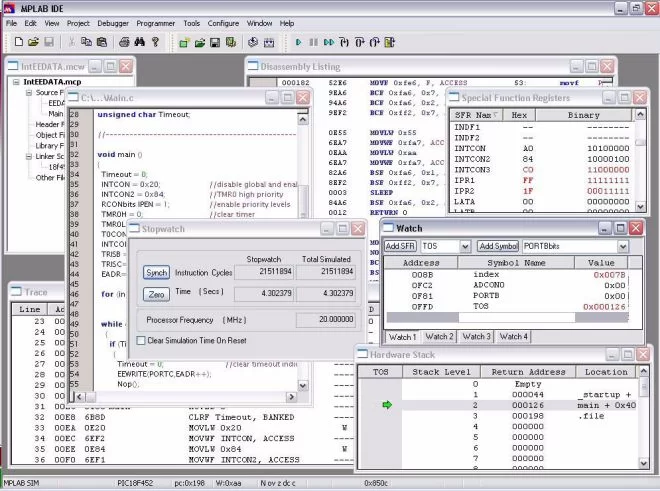
MPLAB is an Integrated Development Environment (IDE) which is a free, integrated toolset for the development of embedded applications employing Microchip’s PIC® and dsPIC® microcontrollers. MPLAB IDE runs as a 32-bit application on MS Windows®, is easy to use and includes a host of free software components for fast application development and super-charged debugging. MPLAB IDE also serves as a single, unified graphical user interface for additional Microchip and third party software and hardware development tools. Moving between tools is a snap, and upgrading from the free software simulator to hardware debug and programming tools is done in a flash because MPLAB IDE has the same user interface for all tools.
Note: Compiler will be needed to install after its installation, its upto which language compiler like c, assembly you install and for which family of microchip microcontrollers like 12f, 18f,32f
How to Use MPLAB IDE
Download MPLAB IDE and use the tutorial in the MPLAB IDE User’s Guide at the bottom of this page to explore how easy it is to create an application. Write assembly code, build and assemble your project with MPLAB’s wizards, then test your code with the built-in simulator and debugger. When you are ready to test your own application, select one of our low-cost debugger/programmers to program a device and analyze your hardware.
Support code in C?
Choose MPLAB C Compilers, the highly optimized compilers for the PIC18 series microcontrollers, high performance PIC24 MCUs, dsPIC digital signal controllers and PIC32MX MCUs. Or, use one of the many products from third party language tools vendors. Most integrate into MPLAB IDE to function transparently from the MPLAB project manager, editor and debugger.
MPLAB IDE features:
- MPLAB C Compilers (free student editions available for download)
- MPLAB REAL ICE™ in-circuit emulator
- MPLAB ICD 2 and MPLAB ICD 3 in-circuit debuggers and engineering programmers for selected Flash devices
- PICkit 2 and PICkit 3 Debug Express economy debug/programmers
- PICSTART Plus development programmer
- MPLAB PM3 device programmer
- Third Party tools, including HI-TECH, IAR, Byte Craft, B. Knudsen, CCS, Micrium, microEngineering Labs, Labcenter, MATLAB, Segger
- A host of low cost starter boards, demonstration and evaluation kits
- Fully integrated debugging with right mouse click menus for breakpoints, trace and editor functions
- Tabbed editor option or separate source windows
- Recordable macros
- Context sensitive color highlighting for assembly, C and BASIC code readability
- Mouse over variable to instantly evaluate the contents of variables and registers
- Set breakpoints and tracepoints directly in editor to instantly make changes and evaluate their effects
- Graphical project manager
- Version control support for MS Source Safe, CVS, PVCS, Subversion
- Programmer’s text editor
- MPLAB SIM, high speed software simulator for PIC and dsPIC devices with peripheral simulation, complex stimulus injection and register logging
- Full featured debugger
- MPASM™ and MPLINK for PIC MCUs and dsPIC DSC devices
- HI-TECH C PRO for PIC10/12/16 MCU Families running in lite mode
- CCS PCB C Compiler
- Labcenter Electronic’s Proteus VSM spice simulator
- Many Powerful Plug-Ins including
- ○ AN851 Bootloader programmer
- ○ AN901 BLDC Motor Control Interface
- ○ AN908 ACIM Tuning Interface
- ○ KeeLoq support
Downloads
- What is MPLAB IDE?
MPLAB IDE is a free 32-bit Windows integrated development environment for developing embedded applications using Microchip PIC and dsPIC microcontrollers. - Can MPLAB IDE be used with C code?
Yes, MPLAB IDE supports C via MPLAB C Compilers and third-party C compilers that integrate into the IDE. - How do I test code in MPLAB IDE?
You can build and assemble projects with MPLAB's wizards, then test code using the built-in simulator and debugger. - Do I need a compiler to use MPLAB IDE?
Yes, a compiler must be installed separately; choice depends on language and microcontroller family. - Can I upgrade from simulator to hardware debugging easily?
Yes, MPLAB IDE provides a unified interface so upgrading from the simulator to hardware debug and programming tools is straightforward. - What hardware debuggers and programmers are supported?
Supported tools include MPLAB REAL ICE, MPLAB ICD 2 and ICD 3, PICkit 2 and PICkit 3, PICSTART Plus, and MPLAB PM3. - Does MPLAB IDE support third-party tools?
Yes, many third-party tools and compilers integrate with MPLAB IDE, including HI-TECH, IAR, CCS, MATLAB, and others. - What editor features does MPLAB IDE include?
Features include a tabbed editor or separate source windows, recordable macros, context-sensitive color highlighting, and mouse-over variable evaluation. - Is there a simulator available in MPLAB IDE?
Yes, MPLAB SIM is a high-speed software simulator with peripheral simulation and register logging for PIC and dsPIC devices.