


Summary of LCD STOPWATCH COUNTDOWN COUNTER CIRCUIT WITH PIC16F877 PICBASIC PRO
This project implements a stopwatch and countdown timer using a PIC16F877 microcontroller with an LCD display. The system utilizes TMR0 interrupts for accurate timekeeping and was designed using Proteus ISIS for simulation and ARES for PCB layout, with code written in PicBasic Pro. It features five buttons for menu navigation, value adjustment, confirmation, start/stop/resume control, and resetting the timer to zero.Parts used in the LCD Stopwatch Countdown Counter Circuit:
- PIC 16F877 microcontroller
- Liquid Crystal Display (LCD)
- TMR0 interrupt module
- Five function buttons
- Proteus ISIS software
- Proteus ARES program
- PicBasic Pro source files
This circuit using a PIC 16F877 microcontroller LCD (Liquid Crystal Display) application was made on the stopwatch and countdown. Counting the TMR0 interrupt for the microcontroller is used. For circuit design and printed circuit board operations and Proteus ISIS... Electronics Projects, LCD Stopwatch Countdown Counter Circuit with PIC16F877 Picbasic Pro "microchip projects, microcontroller projects, pic16f877 projects, picbasic pro examples,
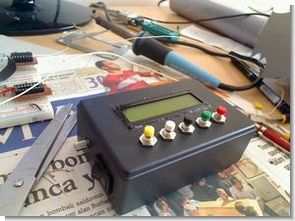
This circuit using a PIC 16F877 microcontroller LCD (Liquid Crystal Display) application was made on the stopwatch and countdown. Counting the TMR0 interrupt for the microcontroller is used. For circuit design and printed circuit board operations and Proteus ISIS Proteus ARES program is used. Flow diagram of the circuit is as follows.
COUNTDOWN COUNTER CIRCUIT FRONT PANEL
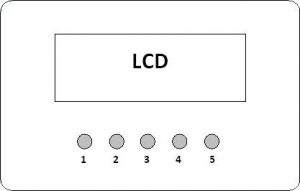
1: to move up in the menu and increase the value of the countdown timer button,
2: to move down the menu button and countdown timer reduction in the value,
3: confirm the selected menu button,
4: Stopwatch and countdown timer for the Start / Stop / Resume button,
5: Stopwatch and countdown timer countdown timer is reset and the hour, minute, second values to be selected,
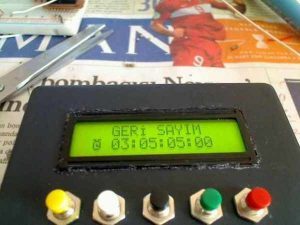
LCD STOPWATCH CIRCUIT DIAGRAMS AND PCB
PIC16F877 with LCD stopwatch and countdown counter all the files belonging to the isis circuit simulation software ares pcb and source files PicBasic pro files
FILE DOWNLOAD LINK LIST (in TXT format): LINKS-6467.zip
Source: LCD STOPWATCH COUNTDOWN COUNTER CIRCUIT WITH PIC16F877 PICBASIC PRO
Quick Solutions to Questions related to LCD Stopwatch Countdown Counter Circuit:
- What microcontroller is used in this circuit?
The circuit uses a PIC 16F877 microcontroller. - How is the time counting achieved in the microcontroller?
Counting is achieved by using the TMR0 interrupt for the microcontroller. - Which software is used for circuit design and PCB operations?
Proteus ISIS is used for circuit design and Proteus ARES is used for printed circuit board operations. - What programming language is used for the source files?
The source files are written in PicBasic Pro. - What is the function of button 4 on the front panel?
Button 4 serves as the Start / Stop / Resume button for both the stopwatch and countdown timer. - How can the hour, minute, and second values be reset?
Button 5 resets the stopwatch and countdown timer and sets the hour, minute, and second values to zero. - What does button 1 do in the menu?
Button 1 moves up in the menu and increases the value of the countdown timer. - Can I download the circuit simulation and source files?
Yes, all files including isis circuit simulation, ARES PCB, and PicBasic pro files are available in the LINKS-6467.zip file.
Related projects
PIC16F877 Driving LCD in 4-Bit Mode using PIC16F877 with Proteus Simulation
Introduction This microcontroller project shows how a PIC16F877 can drive an LCD display using 4-bit mode inside a Proteus simulation.The project demonstrates...
Programmers & ICSP · PIC16F877AEPE PIC/LCD Demo using PIC16F877 with Proteus Simulation
IntroductionThe EPE PIC/LCD Demo is a classic microcontroller project that demonstrates how a PIC16F877 can fully control a PG12864F graphical LCD.Designed as...
Motors & Robotics · PIC16F877AEfficient Sun-Following Robot: A Solar Tracker with Microcontroller Control
Abstract The impending global challenge of dwindling non-renewable fuel resources underscores the urgency of transitioning towards renewable energy alternatives like solar power....
Clocks & TimersAdaptive Alarm Clock: Build a Smart, User-Centric wake-Up system
Project Overview The goal of this ambitious undergraduate project was to develop a novel alarm clock capable of analyzing a person's unique...
Clocks & TimersDesigning Your Ideal Alarm Clock: An Introduction to PIC18
Within this laboratory session, you'll employ the C language to create an alarm clock, delving into the implementation of "C" programs on...
Clocks & TimersBuilding your Dream Alarm Clock Using the PIC18
Objective: In this laboratory session, your objective is to create an alarm clock using the C programming language. You will gain proficiency...

Muhammad Bilal
I am a highly skilled and motivated individual with a Master's degree in Computer Science. I have extensive experience in technical writing and a deep understanding of SEO practices.