


Summary of How to interface LCD with PIC18F4550 Microcontroller
This article details interfacing a 16x2 character LCD with a PIC18F4550 microcontroller to display alphanumeric characters. The LCD operates in 8-bit mode, connecting data pins D0-D7 to PortB and control pins (RS, R/W, EN) to PortA. The project includes initialization steps, command/data transmission logic, and C source code demonstrating how to print specific characters like 'E' and 'G'.Parts used in the LCD Interfacing Project:
- LCD
- PIC18F4550
- Preset
For basic details and operations of character LCD, refer LCD interfacing with 8051. Here LCD has been interfaced in 8-bit mode* with data pins (D0-D7) connected to PortB of PIC18F4550. The LCD control pins RS, R/W and EN are connected to PortA pins RA0, RA1 and RA2 respectively.
Project Source Code
###
// Program to interface 16x2 LCD and display single character using PIC18F4550 Microcontroller
// Configuration bits
/* _CPUDIV_OSC1_PLL2_1L, // Divide clock by 2
_FOSC_HS_1H, // Select High Speed (HS) oscillator
_WDT_OFF_2H, // Watchdog Timer off
MCLRE_ON_3H // Master Clear on
*/
//LCD Control pins
#define rs LATA.F0
#define rw LATA.F1
#define en LATA.F2
//LCD Data pins
#define lcdport LATB
void lcd_ini();
void lcdcmd(unsigned char);
void lcddata(unsigned char);
unsigned int i=0;
void main(void)
{
TRISA=0; // Configure Port A as output port
LATA=0;
TRISB=0; // Configure Port B as output port
LATB=0;
lcd_ini(); // LCD initialization
lcddata('E'); // Print 'E'
Delay_ms(1000);
lcdcmd(0x85); // Position 1st Line, 6th Column
lcddata('G'); // Print 'G'
}
void lcd_ini()
{
lcdcmd(0x38); // Configure the LCD in 8-bit mode, 2 line and 5x7 font
lcdcmd(0x0C); // Display On and Cursor Off
lcdcmd(0x01); // Clear display screen
lcdcmd(0x06); // Increment cursor
lcdcmd(0x80); // Set cursor position to 1st line, 1st column
}
void lcdcmd(unsigned char cmdout)
{
lcdport=cmdout; //Send command to lcdport=PORTB
rs=0;
rw=0;
en=1;
Delay_ms(10);
en=0;
}
void lcddata(unsigned char dataout)
{
lcdport=dataout; //Send data to lcdport=PORTB
rs=1;
rw=0;
en=1;
Delay_ms(10);
en=0;
}
###
Circuit Diagrams
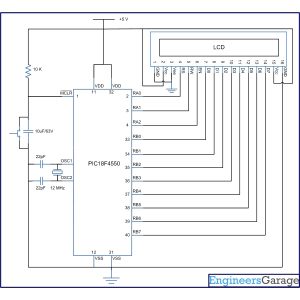
Project Components
Project Video
Source: How to interface LCD with PIC18F4550 Microcontroller
Quick Solutions to Questions related to LCD Interfacing Project:
- How is the LCD configured for operation?
The LCD is configured using commands like 0x38 for 2-line, 5x7 font, and 8-bit mode. - Can the LCD be interfaced in 4-bit mode?
Yes, the text states that Character LCD can also be interfaced by using only 4 data lines. - Which ports connect to the LCD data pins?
Data pins D0 through D7 are connected to PortB of the PIC18F4550. - What is the function of the RS pin?
RS selects the register; it is set to 0 for command registers and 1 for data registers. - How does the system clear the display screen?
The system sends the command byte 0x01 to clear the display screen. - Does the project use an internal oscillator?
No, the configuration bits select a High Speed (HS) oscillator. - What happens when EN is pulsed high to low?
A high to low pulse on EN latches the command instruction or data into the LCD. - How is the cursor positioned initially?
The cursor position is set to the first block of the first line using command 0x80.
Related projects
PICDEM FS USB CDC Evaluation Board using PIC18F4550 with Proteus Simulation
Introduction The PICDEM FS USB CDC Evaluation Board is a practical microcontroller project built around the PIC18F4550, designed to demonstrate USB communication...
Peripheral Tutorials · PIC18F4550PICDEM FS USB Mass Storage Device using PIC18F4550 with Proteus Simulation
Introduction This microcontroller project demonstrates how to simulate a USB Mass Storage Device (MSD) using the PIC18F4550 in a Proteus simulation environment....
Development Boards & Kits · PIC18F2550Pinguino Project: A PIC Microcontroller Based Arduino
This is a complete tutorial to make a PIC Microcontroller based Arduino. This is a complete tutorial to make PIC microcontroller based...
LCD & Display ProjectsLeveraging Blockout Banners for Effective Electronics and Tech Product Displays
Blockout banners have become a popular and effective tool for displaying electronics and tech products in various settings, from trade shows and...
LCD & Display Projects · PIC18F4520Interfacing PIC18F4520 microcontroller with an HD44780 LCD
Introduction Being able to display data from a microcontroller visually has many advantages. It allows for menus, status indicators, and instructions to...
LCD & Display ProjectsVideo Project Development in the Midst of an Impromptu Online Semester
Receiving robot parts in the mail was an unexpected conclusion to the Winter 2020 semester for students. However, when faced with a...

Muhammad Bilal
I am a highly skilled and motivated individual with a Master's degree in Computer Science. I have extensive experience in technical writing and a deep understanding of SEO practices.